The AI Readiness Audit: Preparing Your Data Architecture for Agentic Automation
Agentic automation rarely fails first because of the model. This guide shows SMEs how to audit one workflow for sources, data classes, permissions, review steps, and evidence before connecting an AI agent.
Contents
Agentic automation rarely fails first because of the model. This guide shows SMEs how to audit one workflow for sources, data classes, permissions, review steps, and evidence before connecting an AI agent.
Share this article
The AI agent asks for data nobody owns
Nora runs a technical services company with 42 employees. Sales wants to triage inbound requests faster: which leads are urgent, which need technical clarification, and which do not fit the service offering? An AI assistant should read the messages, rank them, and suggest a next step for Elena, the sales lead.
In the first workshop, the project sounds small. The company handles about 140 inbound requests per week, 650 support emails per month, and roughly 2,400 CRM contacts. It has three SaaS systems, two shared inboxes, twelve recurring spreadsheets, and one early n8n test workflow. Then the actual audit begins. The CRM contains duplicate records. Email attachments are newer than CRM notes. The pricing spreadsheet belongs to Finance. Support exceptions live in an internal runbook page, but not in the help center. Nobody can say which source wins when these records conflict.
This scenario is illustrative, not a Planfold customer story and not a benchmark. It shows the practical point: an AI agent does not need more autonomy first. It needs a reliable operating base. If the workflow does not know which source is authoritative, which data class is allowed, who reviews the output, and what evidence remains, the agent does not accelerate sales. It accelerates ambiguity.
AI readiness does not start with the model
Many AI conversations start with the wrong question: which model should we use? For a real business workflow, that question comes later. First, the team needs to know what the workflow may do. May it only read? May it draft? May it prioritize? May it prepare a CRM update? May it send something? Or must it stop because financial, contractual, employee, or unclear customer data is involved?
The NIST AI RMF Playbook Map supports exactly this early work. The Map function asks teams to understand context, purpose, deployment setting, assumptions, roles, requirements, human involvement, and ongoing monitoring. For an SME, the translation is practical: before an agent becomes part of operations, one concrete workflow needs a task contract, source map, clear review roles, and a lifecycle owner.
Better prompts do not repair conflicting sources. A larger context window does not replace data classification. A stronger model does not automatically know whether yesterday's email overrides last week's CRM note. AI readiness is therefore less a tool comparison than a data architecture audit for one specific workflow.
The distinction from a chatbot matters. A chatbot answers a question in an interface. An agentic workflow reads sources, calls systems, creates suggestions, routes tasks, or prepares changes. The closer that workflow gets to customer communication, proposals, support, CRM, or finance, the more the architecture around the model matters.
The five data gaps that break agentic automation
An AI readiness audit is not looking for abstract perfection. It looks for the five gaps that turn a useful assistant into an unsafe operating path.
Silo gap: Relevant data sits across several systems. CRM, inboxes, help center, spreadsheets, tickets, and team memory each contain part of the truth. If the workflow does not know which source applies to which case, it builds plausible but wrong context.
Quality gap: Stale or duplicate records look machine-readable. A CRM record can be formally complete and factually wrong. A support answer can come from an old exception that no longer applies. The agent sees structure, but not automatically freshness.
Semantic gap: Teams use the same fields to mean different things. "High priority" can mean revenue potential in sales, escalation in support, and deadline pressure in operations. Without semantic rules, the workflow creates categories that look consistent while meaning different things internally.
Permission gap: The workflow can read more than it should. Customer notes, financial fields, contract information, and employee data often sit in the same exports. If technical access is broader than the business purpose, the workflow becomes a data governance risk before it becomes useful.
Evidence gap: Nobody can later reconstruct what happened. Which source was read? Which workflow version ran? What did the AI suggest? Who corrected, approved, rejected, or stopped it? Without that trail, every investigation becomes a memory meeting.
The OWASP Top 10 for Large Language Model Applications gives useful risk vocabulary here: prompt injection, sensitive information disclosure, excessive agency, and overreliance. For SMEs, that does not mean treating every AI project with fear. It means sources, permissions, action scope, and review need tighter design than they would for an ordinary writing assistant.
If these five gaps are ignored, the first production-facing agent becomes detective work. Was the result wrong because the model was weak? Because the source was stale? Because a field was duplicated? Because employee data entered the prompt? Or because the reviewer lacked enough context to decide? An audit reduces that ambiguity before it becomes expensive in operations.
The readiness audit for one real workflow
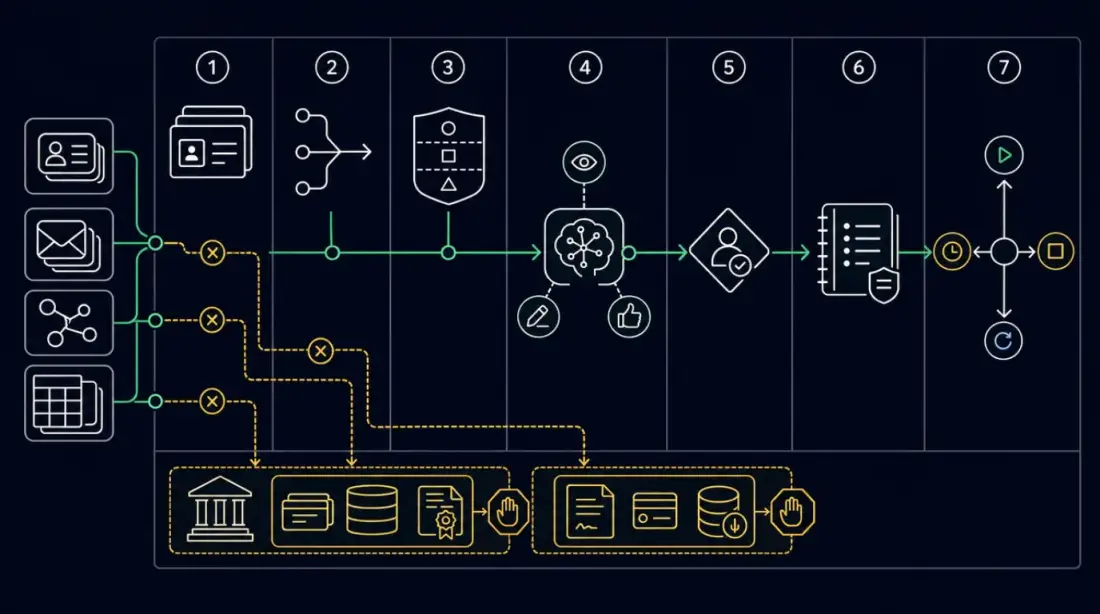
The audit stays lightweight when it focuses on one workflow. Not "AI in the company". Not "agent strategy". Choose one concrete path: inquiry triage, support drafting, quote preparation, meeting-to-task, or internal knowledge search. Then fill seven fields: source, owner, data class, allowed AI action, human approval, evidence, and decision.
| Audit field | Guiding question | Good starting signal | Warning signal |
|---|---|---|---|
| Source | Which systems does the workflow need? | Source and purpose are named | CRM, email, and spreadsheet conflict |
| Source of truth | Which source wins in a conflict? | Business rule is documented | "Elena usually knows" |
| Data class | Which data may enter the AI step? | Public, internal, customer, or blocked is clear | Finance, contract, or employee data sits in the same export |
| Allowed action | May AI observe, draft, recommend, prepare an update, or stop? | Action is narrow and reversible | Workflow may send or write before review exists |
| Human review | Who reviews with context and authority? | Reviewer has decision power | Approval is only a click without sources |
| Evidence | What remains in the log? | Source, version, decision, and correction are visible | Errors are reconstructed from chat history |
| Decision | Start, contain, rebuild, or defer? | Smallest safe starting point is clear | Everything is meant to run autonomously immediately |
The decision states should stay simple. Observe means read, summarize, classify. Draft means prepare text or a task, not send it. Recommend means rank or suggest the next step while a human decides. Prepare update means propose a system change while the owner approves. Stop means route to a human because data class, source, or responsibility is unclear.
This model is deliberately narrower than many AI promises. It prevents a helpful assistant from quietly becoming a production agent. At the same time, it makes the start easier: a workflow that only reads and prioritizes can be tested earlier than a workflow that sends customer messages or writes CRM fields.
Practical example: inquiry triage with human approval
Return to Nora, Elena, Marie, and Jonas at a 42-employee DACH-based B2B technical service provider. The company is an illustrative DACH scenario: 42 employees, no dedicated platform team, but enough digital tools to create real friction. Nora wants one visible automation candidate. Elena wants faster lead sorting. Marie wants support drafts that do not depend on stale knowledge. Jonas can maintain APIs, n8n workflows, credentials, and logs, but only alongside other responsibilities.
Before the audit, inquiry triage depends on people. Elena reads emails, checks CRM context, looks up service information, asks operations for context, and manually writes next steps. Some inquiries move quickly. Others hang because Finance pricing does not match an old CRM note. The AI trial could summarize messages, but it does not know which data it must not touch.
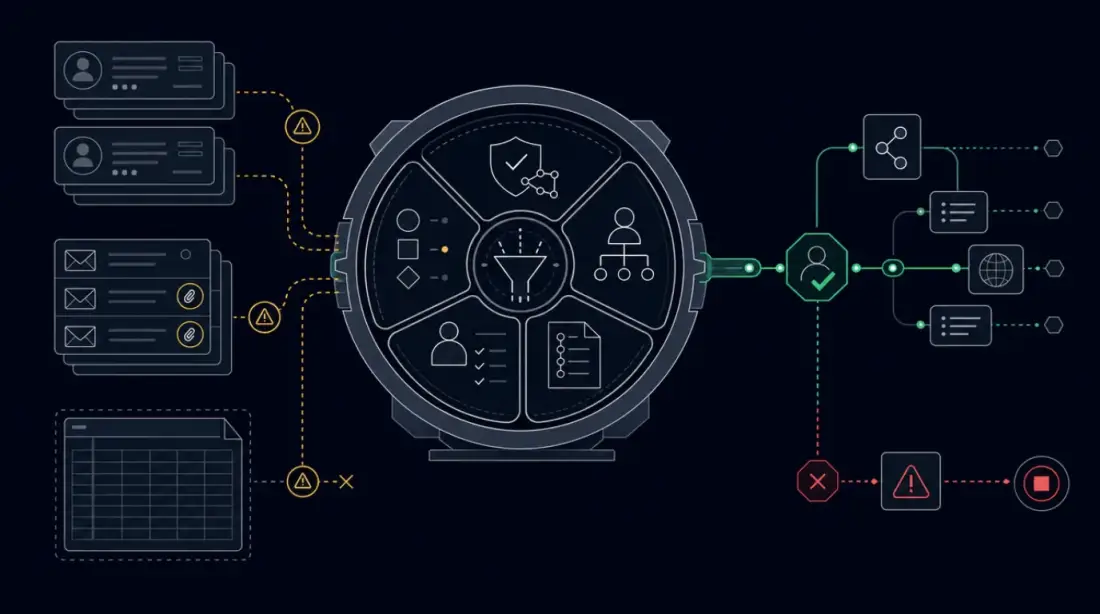
After the audit, the workflow is narrower. Public and internal service information is allowed. Defined CRM fields may be read. Finance and contract data are blocked at first. The agent classifies inquiry type, missing information, and rough priority. It prepares an internal summary and reply draft. Elena confirms priority and next step. No customer email is sent automatically. No CRM field is written until Jonas has checked field mapping, rollback, and the error path.
n8n can serve as the controlled workflow layer here. The documentation describes execution history, error handling, and patterns for human fallback in AI workflows. That is not automatic governance or a compliance guarantee. It is implementation support so execution, failures, human handoffs, and review context do not have to be reconstructed from memory.
The result is not an autonomous sales agent. It is an operable first step: better sorting, clearer data boundaries, traceable review decisions, and a pattern that can later move into support drafts or quote preparation. The value comes from the boundary.
How Planfold builds the data architecture for automation
Planfold treats AI automation as operating architecture, not model procurement. The first step is therefore not a prompt workshop, but a map: which technical debt sits inside the workflow? Which sources exist? Which data flows are official, and which are only habits? Who owns the decision? Which credentials are needed? Where must the workflow stop?
Plan means auditing data flows, technical debt, data classes, owners, system boundaries, review points, and stop paths. In a small company, this does not need to become an enterprise program. A source map, task contract, and decision table are often enough to show whether a workflow should observe, draft, recommend, or be deferred.
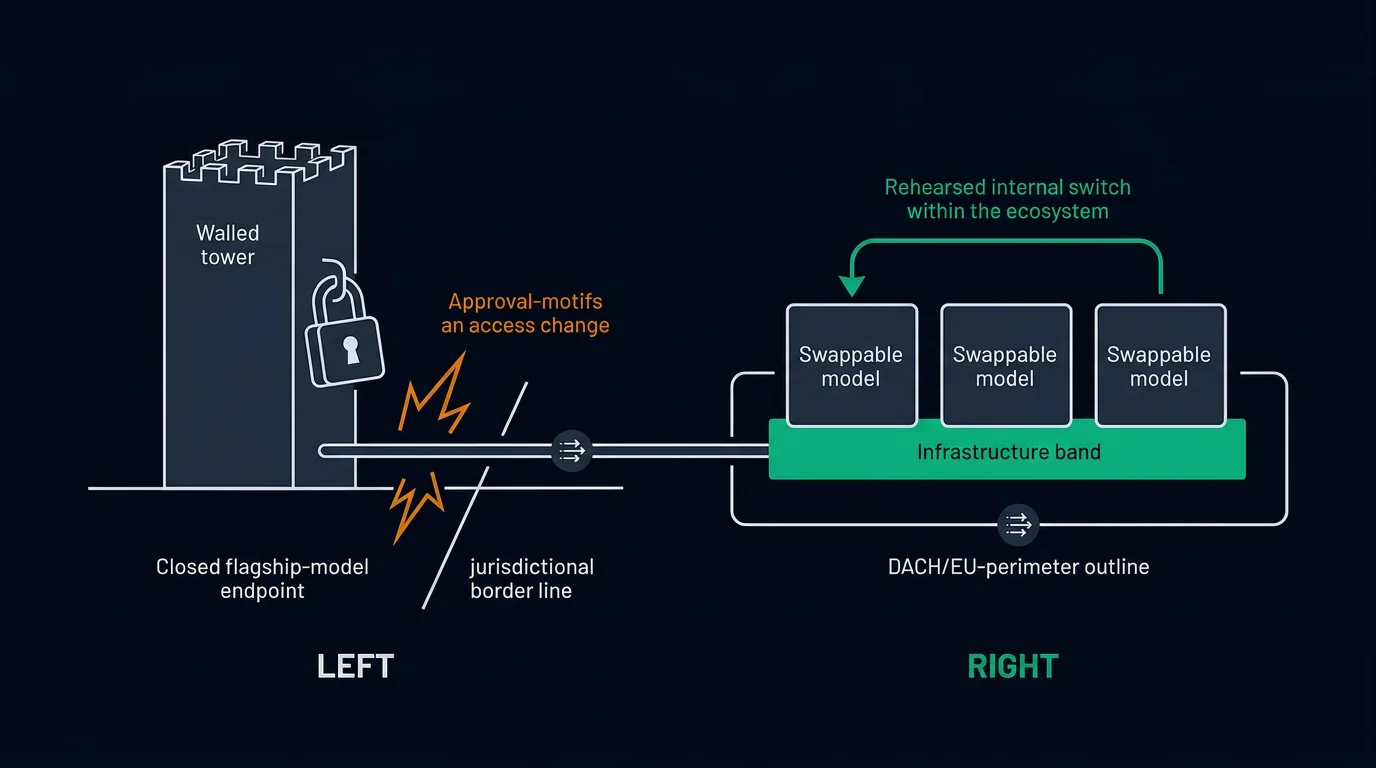
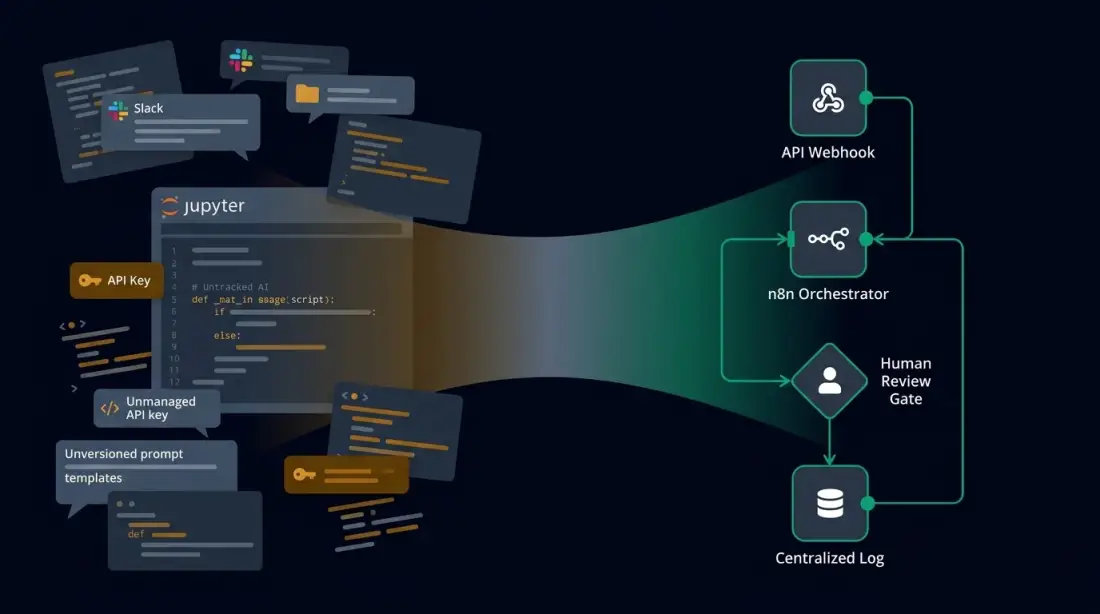
Unfold means building the controlled workflow layer. That includes APIs instead of manual exports, n8n orchestration instead of private shortcuts, dedicated credentials instead of personal accounts, approval steps instead of silent actions, and logs instead of chat screenshots. When data control, isolation, portability, or ongoing operations become more important, the runtime can be DACH-hosted, self-hosted, or cloud-native. Kubernetes, CKA/CKAD capability, and Linux operations are then signals of operational capability, not compliance badges.
Resonate means reviewing operating signals. How many suggestions were accepted, corrected, rejected, or escalated? Which sources are often missing? Where do humans click through approval too quickly? Which failures repeat? These signals decide whether the agent should become broader, stay narrow, or stop moving toward more automation.
Regulatory topics need careful boundaries. The European Commission describes the AI Act as a risk-based framework with requirements around data quality, logging, documentation, human oversight, robustness, and security for certain roles and systems. This article is not legal advice, system classification, or a compliance check. It describes the architecture work that makes conversations with legal counsel, data protection, customers, or auditors more concrete: purpose, data, owner, review, evidence, and stop path.
The first step: a 30-day data architecture audit
A useful AI readiness audit must be small enough to happen. Four weeks are enough to move one workflow from guesswork into a defensible start decision.
Week 1: source map. Gather every source the workflow uses today or would need to use: CRM, inbox, help center, spreadsheets, ticket history, internal runbooks, documents, and team knowledge. Mark conflicts. For each conflict, write which source wins in which case.
Week 2: data classes and owners. Assign fields and documents to data classes: public, internal, customer, employee, finance, contract, or blocked. Name business owners, technical owners, reviewers, and escalation paths. If nobody is willing to own the workflow, it is not ready.
Week 3: review step and stop path. Define which AI action is allowed and when a human must decide. Create stop paths for unclear sources, sensitive data, and missing approval. A good stop path is not failure. It prevents an unclear case from becoming an automated normal case.
Week 4: first controlled automation candidate. Choose the smallest safe starting point. Often that is a read-only or draft-only workflow: classify, summarize, prepare a draft, human decides. Only once sources, review, and evidence are stable should the team discuss prepared updates or more autonomy.
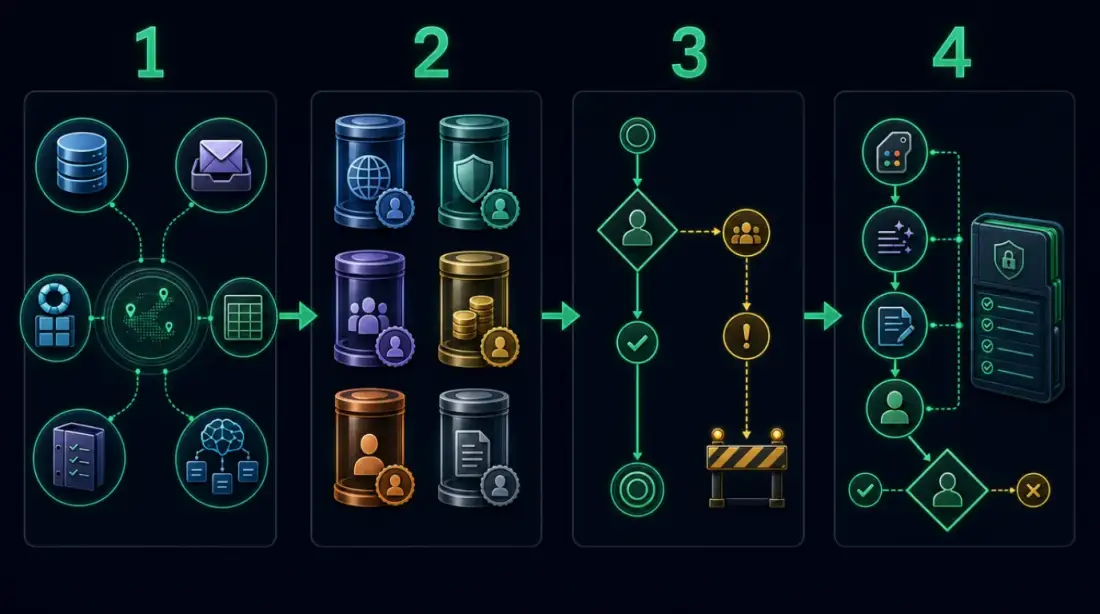
The practical next step is not "more AI". It is one workflow, one source map, one review step, and one log model. If those four pieces are missing, the agent is too early for operations. If they are clear, Planfold can turn them into a roadmap and controlled automation that your team can understand, operate, and stop.
Plan. Unfold. Stay Sovereign.