From Email Forwarding to Controlled Workflows: What n8n Really Delivers for SMEs
Why repetitive manual handoffs between email, spreadsheets, and existing systems are a hidden operational risk — and how n8n workflows give SMEs reliable process structure without a DevOps team.
Contents
Why repetitive manual handoffs between email, spreadsheets, and existing systems are a hidden operational risk — and how n8n workflows give SMEs reliable process structure without a DevOps team.
Share this article
The Monday Petra Was on Holiday
Petra Hoffmann is the office manager at a family-run precision parts manufacturer with 32 employees. She handles onboarding, invoices, and supplier correspondence — and works only four days a week. This Monday, she is off.
At 8:15 a.m., the first invoice from a new supplier lands in the inbox of Michael, the managing director. Michael does not immediately recognise the amount and forwards the email to Petra — who is not there. The message sinks into her inbox, where it will sit until Tuesday morning when Petra returns to the office.
At 9:30 a.m., a new intern reports at reception. He needs an access badge, SharePoint access, and an entry in the Active Directory. Normally Petra completes this in half an hour. Today, no one knows exactly which steps are required. Lars Schmidt, the external IT support, only visits on Thursdays.
At 2 p.m., a supplier calls to ask about the status of an order that was confirmed by email. Michael searches his inbox but cannot find the confirmation — it is in Petra's inbox because the supplier sent it to the general address that Petra monitors.
This Monday is not a disaster. Nothing is on fire. But three processes are interrupted, two customers or suppliers are waiting longer than necessary, and Michael spends half the day catching up on tasks that should be routine. The OECD's D4SME 2025 study finds that only 8 % of small and medium-sized enterprises have achieved transformative digital integration — while 16 % remain at basic adoption. The family-run precision parts manufacturer sits somewhere in between: digitalised enough to use email, not enough to run processes independently of individual employees.
The real cost trap is not the single lost day. It is the permanent inability to delegate, scale, or audit routine work. When Petra falls ill, takes holiday, or leaves the company, the family-run precision parts manufacturer does not just lose an employee — they lose the process itself. According to Prialto, a specialist in virtual business assistance, organisations built around a single individual's knowledge are "only one resignation or one medical leave away from serious disruption." The full cost includes operational interruption, limited scalability, and reduced business valuation.
What Workflow Automation Really Means — and What It Does Not
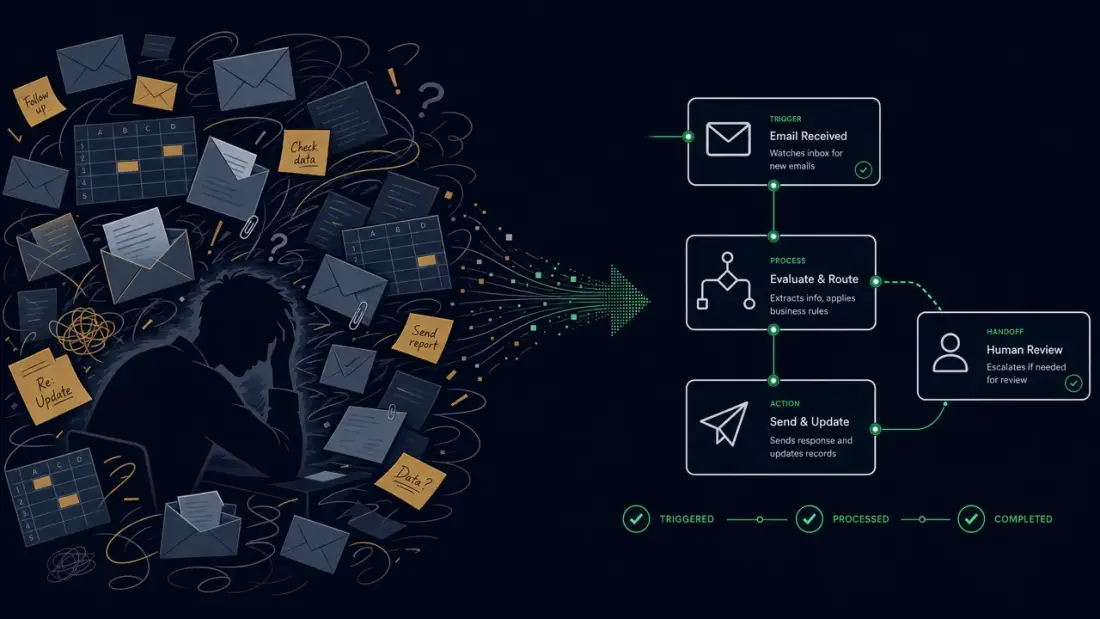
Workflow automation sounds like a technology decision. In practice, it is an operations decision. It answers the question: Which recurring steps in your business currently run on personal knowledge, email forwards, and spreadsheet entries — and how can you make them reliable, traceable, and scalable?
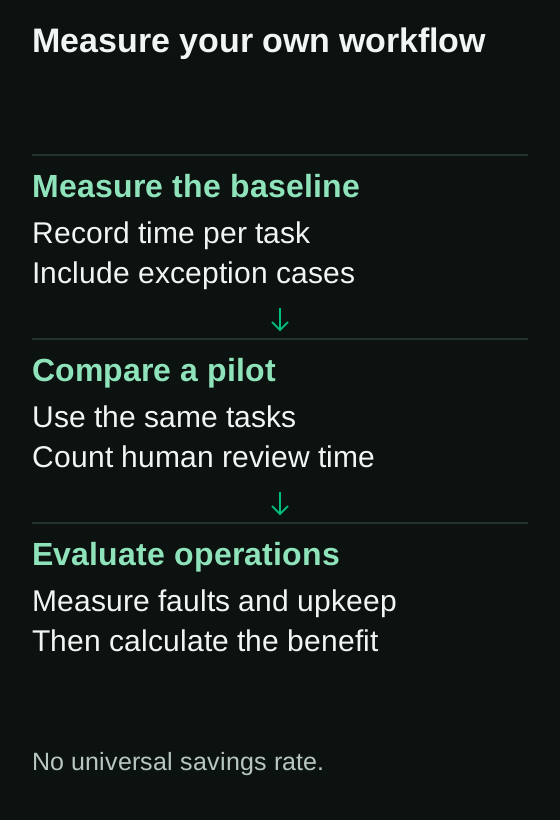
A business case needs measurements of your own process: how often does the task occur, how long does it take, and which exceptions need human review? A general savings rate collected from marketing statistics cannot answer those questions. Measure the baseline and compare it with a limited pilot.
But before we reach the solution, we need to clear up two misconceptions.
Not a Replacement for People, but for Forgotten Steps
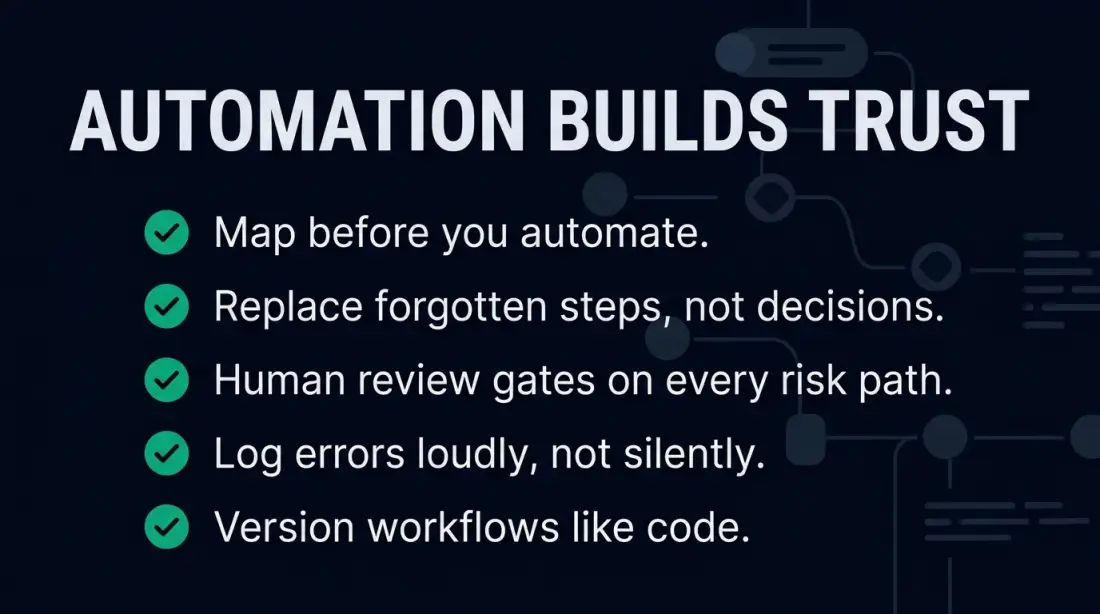
Automation does not replace the decision whether a new supplier should be added to the system. It replaces the five manual clicks required to transfer supplier data from an email into SharePoint, create the same record in accounting, and send a notification to purchasing.
The difference is decisive: people remain responsible for decisions, judgment, and exceptions. Machines take over the steps that get forgotten, swapped, or delayed — especially on Friday afternoons, during holiday season, or when email volume obscures oversight.
A 2026 preprint by Amir and Atif compares one lead-processing workflow over 20 manual and 25 automated runs. It reports averages of 185.35 versus 1.23 seconds and no observed errors in the automated runs. This small experiment does not establish error-free automation or a general savings rate for SMEs.
The Three Pillars: Trigger, Process, Handoff
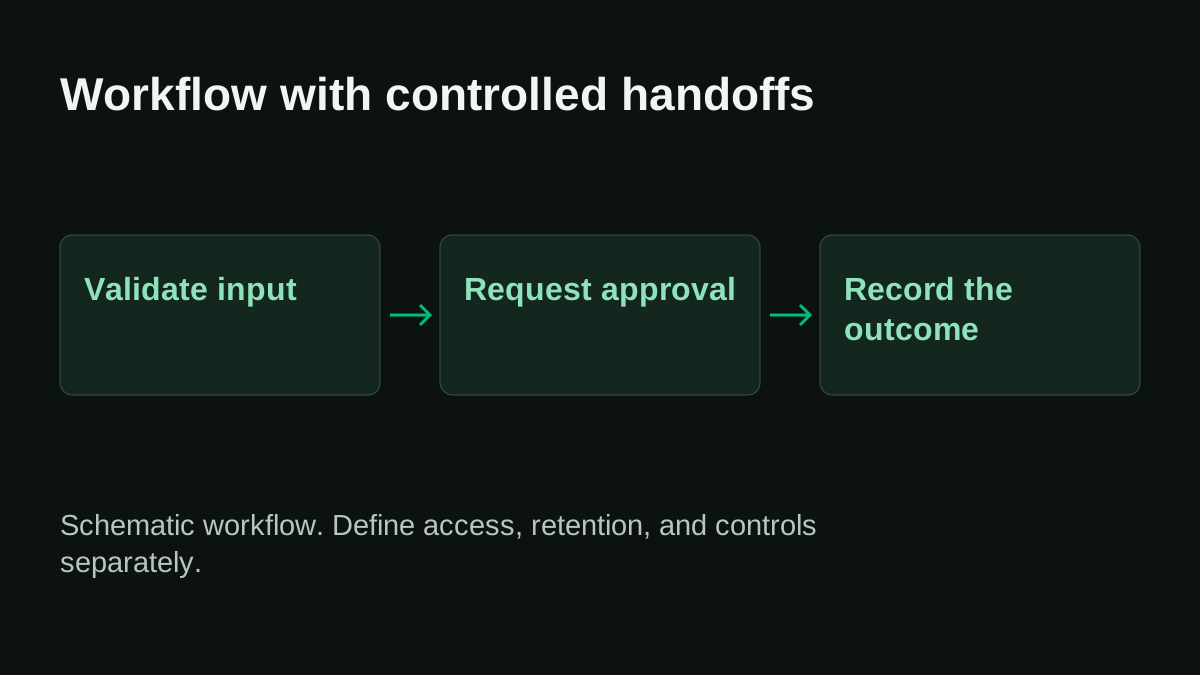
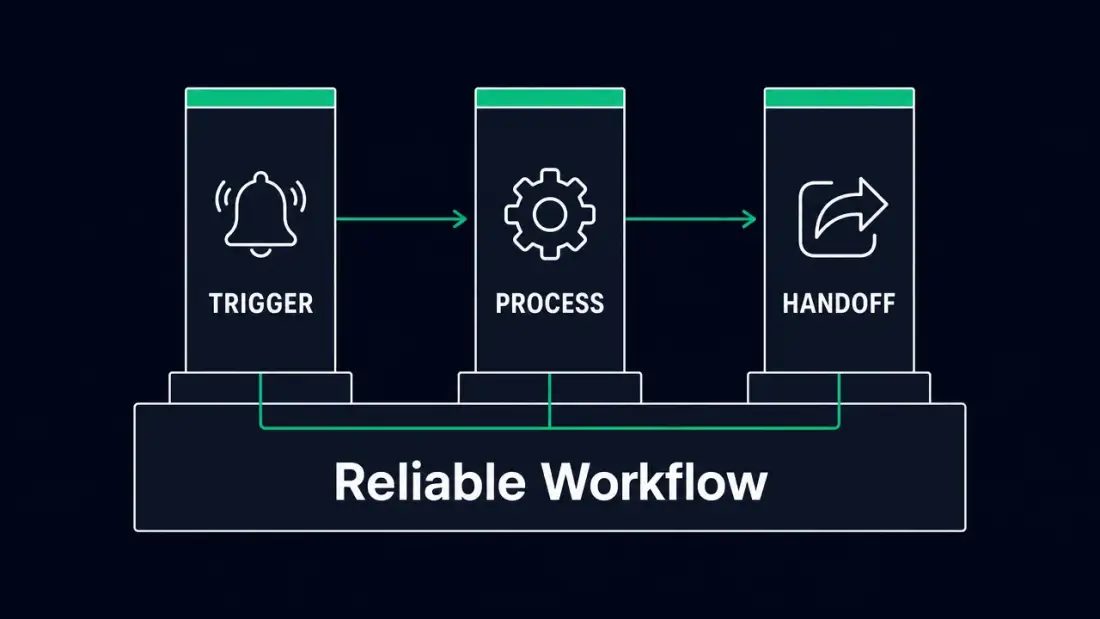
Every reliable workflow consists of three elements:
-
Trigger: An event starts the process. This can be an incoming email, a new entry in a spreadsheet, a webhook from an existing system, or a time-based timer.
-
Process: The workflow executes defined steps — transforming data, querying systems, checking conditions, applying decision logic.
-
Handoff: The result is passed to the next system or person — with documentation, notification, and traceability.
If any of these three pillars is missing or unclear, you do not have a workflow. You have a habit that rests on one person.
Three Warning Signs Your Operations Depend Too Heavily on Individuals
Not every company immediately recognises that it has a person-dependency problem. Many operations managers intuitively sense that something is wrong but cannot name it. Here are three concrete warning signs you can check against your own business.
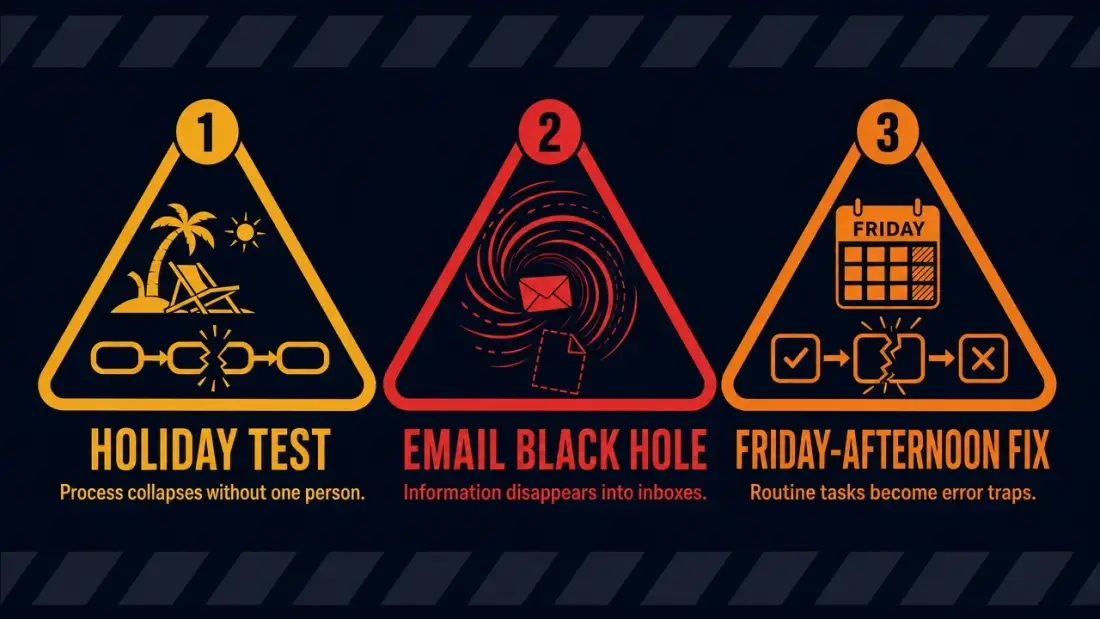
1. The Holiday Test: When a Process Collapses Because One Person Is Away
Imagine your office manager or accountant calls in sick tomorrow. Which processes keep running? Which stall? For how many workflows would you say: "Petra usually handles that"?
At this family-run precision parts manufacturer, the holiday test is sobering: invoice intake, onboarding initiation, and supplier correspondence all run through Petra's inbox and her personal files. When she is absent, the process no longer exists. It only exists as knowledge in her head.
The holiday test is not an academic exercise. According to Prialto (2026), key person dependency is a structural business continuity risk — not merely an HR issue. The full costs include operational disruption, limited strategic flexibility, and lower valuation during business sales or financing.
2. The Email Black Hole: When Information Disappears Into Inboxes
A supplier sends an invoice to [email protected]. Petra forwards it to Michael because the amount is unusually high. Michael replies: "Please send to accounting." Accounting replies: "We need the purchase order number." Petra searches for the purchase order number, finds it in an Excel file on her desktop, sends it to accounting — who is meanwhile busy with other tasks and marks the email as done without processing it.
This email loop costs more than time. It costs trust. The supplier notices the delay. Michael loses track. Petra works through messages in the evening that should have been handled in the morning.
OECD data shows that 16 % of SMEs remain at basic digital adoption — often precisely because information is trapped in personal inboxes and local files instead of flowing through structured, accessible workflows.
3. The Friday-Afternoon Fix: When Routine Tasks Become Error Traps
Routine tasks that should happen daily accumulate through the week and get rushed through on Friday afternoon — exactly when error probability is highest. Wrong data entry, missed onboarding steps, incomplete supplier records.
Amir and Atif examine a defined workflow in a small experiment. Their study does not isolate fatigue or stress as causes of manual errors. Your own deployment also needs tests for invalid input, expired credentials, API failures, and duplicate executions. A fast normal case is only one part of a reliable workflow.
The Hidden Cost Drain: How Manual Handoffs Slow SMEs Down
The following example uses hypothetical planning assumptions, not measured results or typical savings rates.
The costs of person-dependent processes rarely appear on any invoice. They hide in consumed time, delayed payments, reworked errors, and missed opportunities.
Hours That Never Appear on an Invoice
Consider this family-run precision parts manufacturer as an illustrative model — not a universal benchmark, but a realistic calculation for an SME of this size:
- 40 to 50 invoices per month manually transferred from emails into accounting: roughly 2 to 3 hours per week.
- 15 to 20 supplier emails per week that are sorted, forwarded, or manually answered: roughly 1.5 to 2.5 hours per week.
- Model assumption: 12 onboardings per year at 9 hours of coordination each total 108 hours per year, or roughly 2 hours per calendar week.
- Daily manual handoffs between email, SharePoint, and Active Directory: roughly 2 to 3 hours per week.
That adds up to an estimated 8 to 12 hours per week spent on manual handoffs, error corrections, and follow-ups — without these hours ever appearing as a cost line item. They are booked as "office work" or "administration," not as structural inefficiency.
No savings rate has been measured for this illustrative business. Start with invoice intake, onboarding, or supplier notifications and record processing time, exceptions, and rework. Only the pilot can show how much work disappears and how much oversight and maintenance it adds.
Follow-On Costs: Errors, Delays, and Burned Trust
The direct time losses are only the visible half. The follow-on costs are subtler and more expensive:
- Payment delays: An invoice stuck in an email loop leads to late payments, reminder fees, and strained supplier relationships.
- Onboarding gaps: A new employee whose Active Directory entry or SharePoint access is delayed cannot work productively — their first week costs more than it should.
- Audit inability: When a process happens in personal inboxes and local Excel files rather than structured workflows, you cannot provide an evidence chain for a compliance audit. This is not a theoretical problem — it is a real hurdle for companies pursuing ISO certifications or supplier audits.
- Scaling ceiling: When every new customer volume requires proportionally more manual work, your business does not grow. You do not hire new customers — you hire rework.
An observed error rate from one lead-processing workflow cannot be transferred to invoices. Measure which fields are copied incorrectly in your own invoice intake, which documents are missing, and how many cases need manual correction. That baseline determines the validation rules an automated workflow needs.
From Trigger to Action: A Pragmatic Introduction to n8n Workflows
n8n is a workflow platform that can be self-hosted. Permitted use depends on its license and any applicable commercial agreement. Server capacity and connected APIs constrain throughput. The execution configuration also includes configurable timeouts. Self-hosting brings operating responsibilities, not unlimited performance.
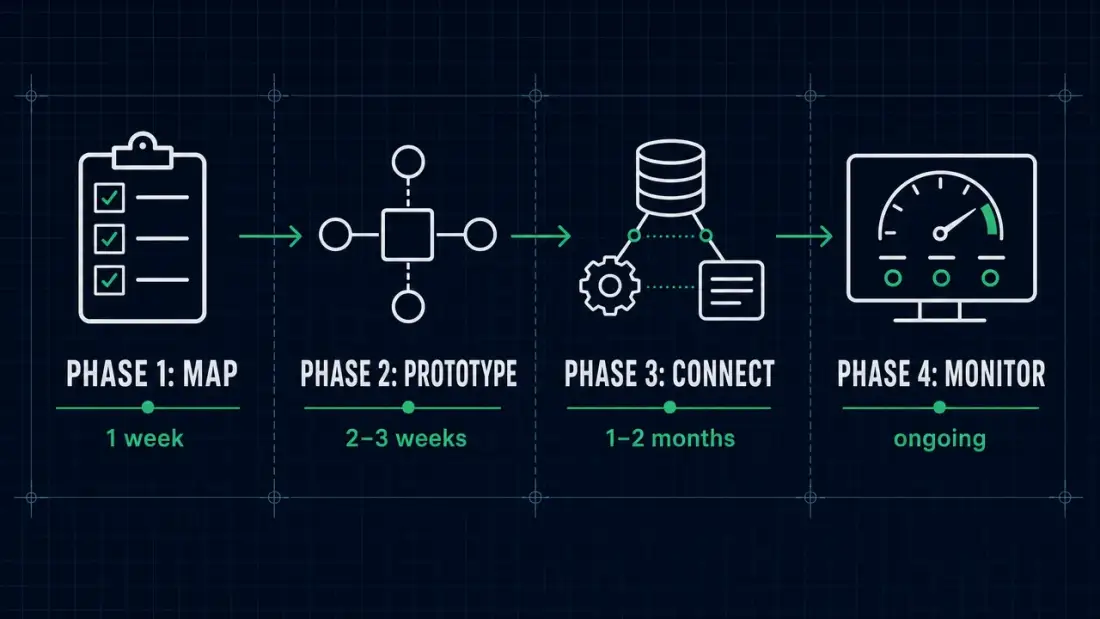
But n8n is not a magic wand. Success depends on how you approach adoption. Here is a pragmatic, phased path for companies like this family-run precision parts manufacturer — teams without dedicated automation engineers, but with clear pain points.
Phase 1: Map Your Processes (1 Week)
Before you build a single workflow, document what happens today. This is tedious but indispensable.
Questions for the inventory:
- Which recurring tasks happen daily or weekly?
- Which information flows from which system into which other?
- Who is responsible for which step?
- Where do the most frequent errors or delays occur?
- What happens when the responsible person is unreachable?
The result does not need to be a formal process landscape. A simple document listing five to ten recurring workflows, their triggers, steps, and handoffs is sufficient. This family-run precision parts manufacturer would likely identify: invoice intake, onboarding initiation, supplier email forwarding, monitoring alert response, leave request forwarding.
Phase 2: Test Your First Workflows (2–3 Weeks)
Choose a single, low-risk process for your first workflow. Ideal criteria:
- It is repetitive (occurs at least weekly).
- It has clear rules (few exceptions).
- It is not business-critical in the sense of "if it fails, the company stops."
- It connects systems that already support APIs or webhooks.
A typical first workflow for this family-run precision parts manufacturer might be: "When an email with the subject 'Invoice' arrives in the info mailbox, extract sender and subject, create an entry in the SharePoint list 'Incoming Invoices,' and send a notification to Petra and accounting."
This workflow does not replace a decision. It replaces the manual copying, sorting, and forwarding. The decision whether to pay the invoice still rests with a human.
Phase 3: Connect to Existing Systems (1–2 Months)
Once the first workflow runs stably, expand the connections. n8n offers over 400 native integrations — from email servers through SharePoint and LDAP/Active Directory to ticketing systems and monitoring tools. More important than the count is the flexibility: n8n also allows custom HTTP requests to systems without a ready-made connector.
For this family-run precision parts manufacturer, the next stage might mean:
- The onboarding workflow does not just create a SharePoint notification but also triggers an LDAP entry and a Keycloak account.
- The supplier workflow does not just read emails but also checks whether the supplier already exists in the system and supplements missing data automatically.
- A monitoring workflow receives alerts from the monitoring system and automatically creates a ticket in the internal ticketing system — with prioritisation and assignment.
Planfold operates such workflows in practice: the proof page for n8n operations automation documents anonymised case studies from ticketing, monitoring, onboarding, identity management, and email-to-SharePoint data handoffs.
Phase 4: Monitor, Handle Errors, and Improve (Ongoing)
A workflow that runs is not finished. It needs:
- Error handling: What happens when an API endpoint is unreachable?
- Logging: Who executed which step when?
- Regular reviews: Are the workflows still running as planned?
- Versioning: Who made which change when?
This last point is especially important for SMEs. If Lars Schmidt, the external IT support, built the workflow and leaves the company, someone else must be able to understand what the workflow does and how to adapt it. With n8n, workflows are exportable as JSON files and version-controlled — an advantage over purely visual no-code platforms where logic is trapped in a proprietary interface.
Error Handling and Approvals: Why Automation Fails Without Humans in the Loop
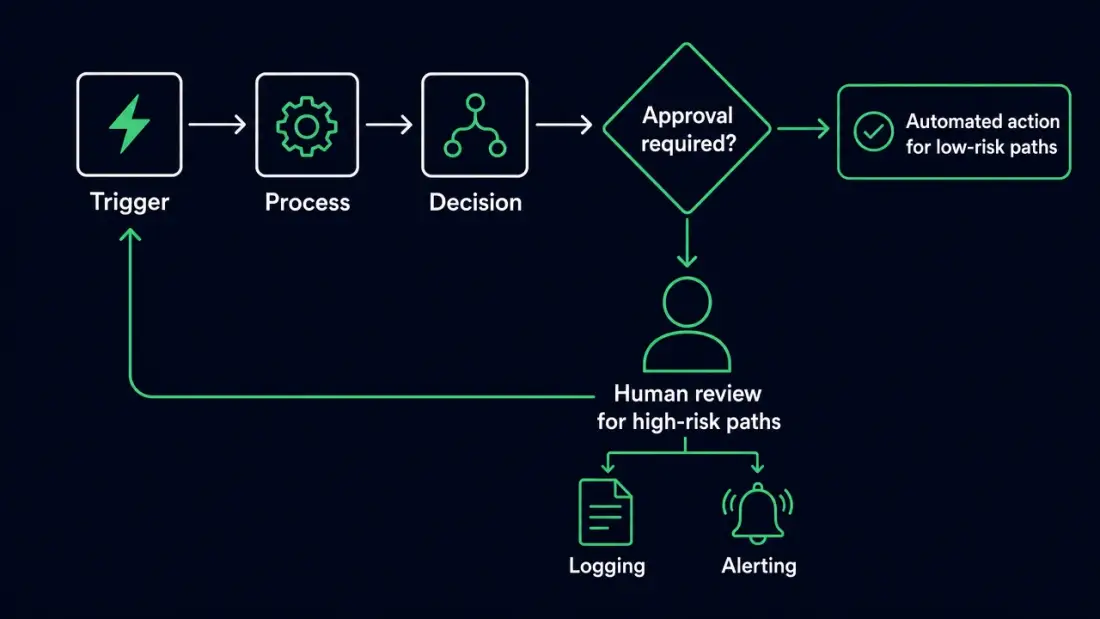
The biggest misconception about workflow automation is the assumption that everything should run fully automatically. The opposite is true: the best workflows are those that know exactly when they must wait for a human.
When a Workflow Should Pause and Wait for Approval
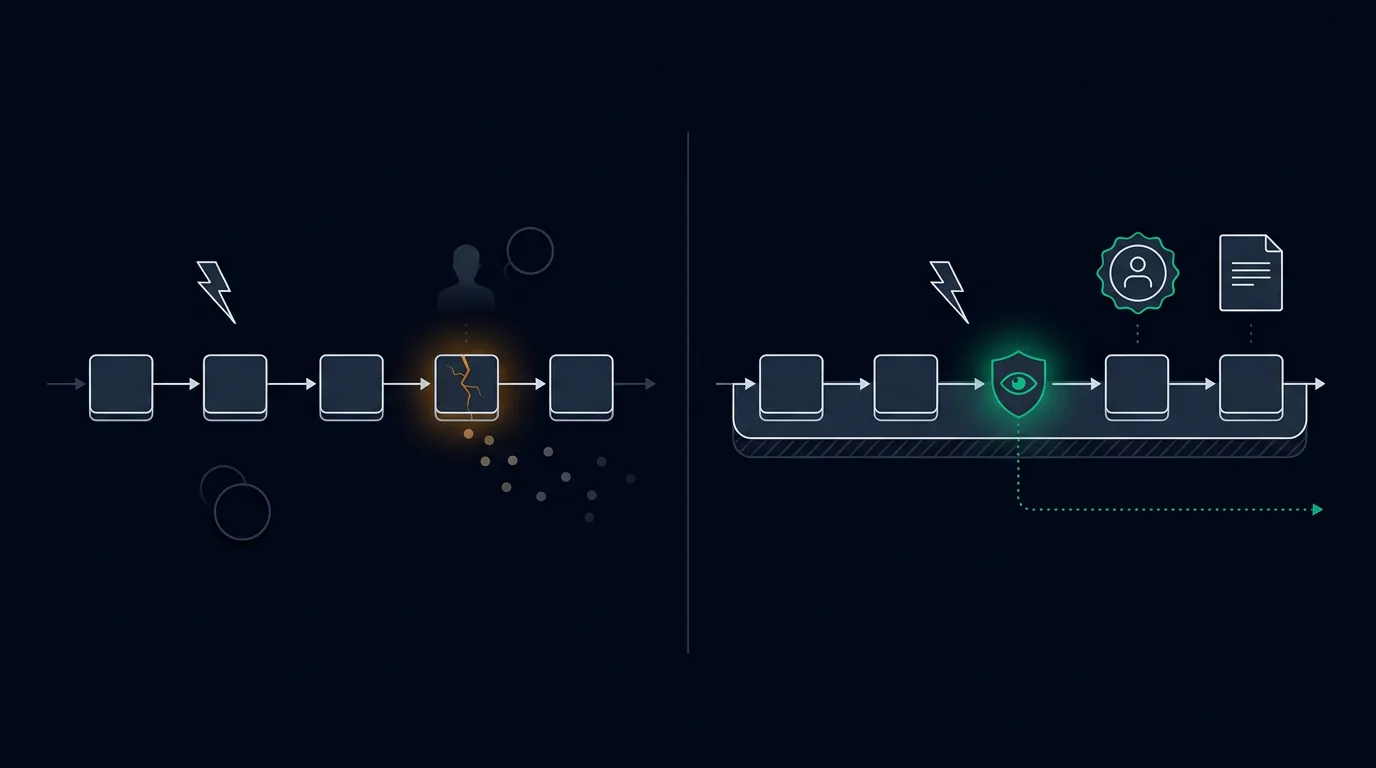
Not every step should be automated. A workflow without human review gates replaces a known fragility (person dependency) with a new, unknown fragility (silent automation errors).
Concrete rules for this family-run precision parts manufacturer:
- Invoices over €5,000 require manual approval by Michael, the managing director. The workflow must not trigger the payment automatically — it may only capture, categorise, and present the invoice to Michael for approval.
- Every onboarding workflow ends with a confirmation email to Petra, who checks whether all access permissions actually work before welcoming the new employee.
- Termination workflows are not automated at all. They are too sensitive, too legally relevant, and too individual to follow a generic rule.
These stop-and-wait patterns are natively implementable in n8n. The workflow pauses at a defined node, sends a notification, and waits for a human decision before proceeding.
Logging and Alerting: Silent Errors Destroy Trust
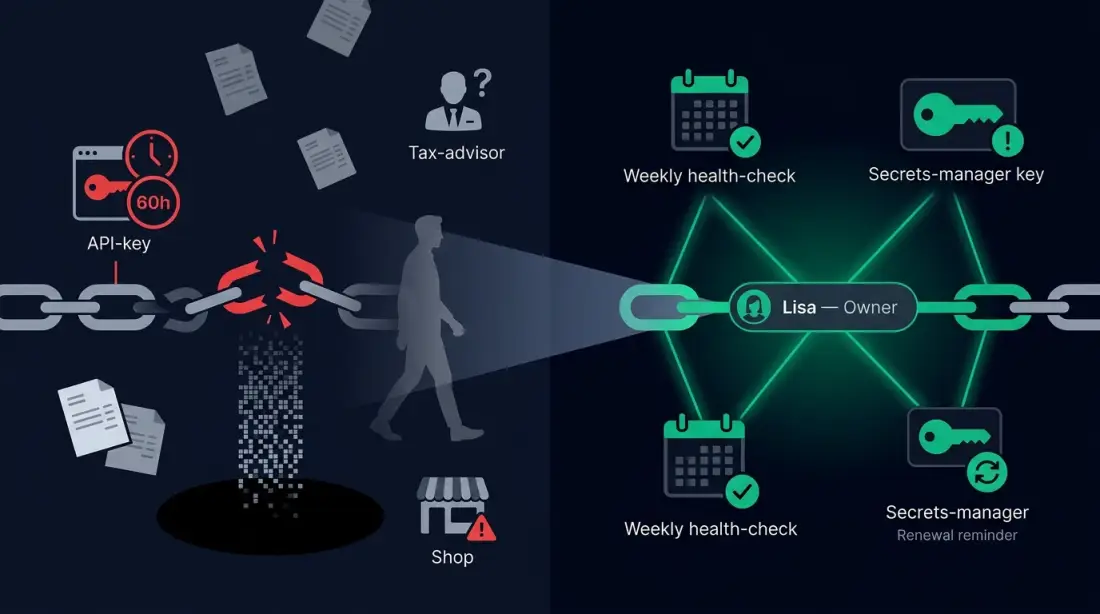
A workflow that fails silently is worse than no workflow at all. If Petra assumes all invoices are being automatically captured but the workflow has not run for three days due to an expired API token, a false sense of security develops — and a growing queue of unprocessed invoices.
Ongoing operations require defined error handling, credential management, and maintenance. Document who responds to failed runs, which retries are allowed, and how safe manual takeover works. These requirements extend beyond the normal case of a small experiment.
Concrete measures:
- Weekly error log check: All failed workflow executions are captured in a central log. Once per week, Petra (or Lars) reviews the list and manually addresses the failures.
- Alerting on repeated errors: If a workflow fails three times in succession, n8n sends an email or Slack message to the defined responsible person.
- Credential rotation: API keys and credentials are not stored inside the workflows themselves but in n8n's integrated credential vault. Regular rotation prevents an expired token from paralysing the entire process.
The Planfold Perspective: Automation as a Reliable Process Layer, Not an Experiment
Planfold treats workflow automation as operational infrastructure, not a one-off project. The difference is decisive: an experiment is built, tested, and often forgotten. A process layer is documented, monitored, versioned, and continuously improved.
Why Orchestration Is More Than a Collection of Scripts
Many businesses already have scripts, macros, or small automations — a Python script here, an Excel macro there, a Zapier workflow for the newsletter. The problem: these solutions are isolated, undocumented, and tied to the person who built them.
Orchestration means bringing these isolated pieces into an overarching structure:
- Every workflow has a defined trigger, clear processing logic, and a traceable handoff.
- Every workflow has a defined owner — not the person who built it, but the role responsible for its function.
- Every workflow is versioned, so changes are traceable and reversible.
- Errors are not ignored but logged, alerted, and handled.
Self-hosted workflows give the company control over configuration, access, and storage. Connected services can still process data externally. Legal basis, processing agreements, retention, and any international transfers must therefore match the actual data flow. Exportable workflows help with switching, while connectors and services remain technical dependencies.
This sovereignty is not an abstract ideal. It is the difference between an automation you own and one you depend on. Planfold's Standard page describes n8n as "the glue" that connects systems and automates business logic — with self-healing tasks that do not give up on errors but retry or alert.
The Next Step
Ask yourself a simple question: If your office manager or accountant were unavailable tomorrow — which processes in your business would keep running, and which would stall?
If the answer is uncomfortable, you do not have a staffing problem. You have a process problem — and process problems can be solved structurally.
The pragmatic entry point does not begin with a complete digitalisation strategy. It begins with a single inventory, a single test workflow, and a clear rule: automation replaces forgotten steps, not human decisions.
Companies that take this path do not just gain time. They gain the ability to scale, audit, and delegate — without every new customer volume requiring proportionally more manual rework.