The AI Agent Runbook: How SMEs Keep Autonomous Workflows Under Control
AI agents become operational quickly. This guide shows how SMEs define task scope, data access, approvals, logs, rollback, and ownership before agents touch real workflows.
Contents
AI agents become operational quickly. This guide shows how SMEs define task scope, data access, approvals, logs, rollback, and ownership before agents touch real workflows.
Share this article
The moment an AI agent becomes part of operations
The first AI agent rarely starts as an official transformation program. It starts as relief: someone summarizes customer emails, a founder drafts replies, operations classifies inbound requests, or a team connects an LLM node to an n8n workflow. At first, it is only assistance. A few weeks later, daily work depends on it.
That is the boundary where the work changes. An agent is no longer "just chat" when it reads CRM context, prepares customer promises, creates tasks, summarizes files, or triggers automations. It becomes part of your Digital Headquarters. It needs an operating model before it can be treated like a normal productivity tool.
Gartner predicted in 2025 that task-specific AI agents would move quickly into enterprise applications. Eurostat reported for 2025 that 20.0 percent of EU enterprises with at least ten employees used at least one AI technology. That does not prove that every SME is already running autonomous agents. It does show that AI is no longer only an experiment, and the first operational agents will appear where work already flows through tools.
So the better question is not: "Should we use agents?" The better question is: "Which agent may read, suggest, change, log, escalate, and stop what?" A small company does not need a heavy governance program to answer that. It needs an AI Agent Runbook.
The cost of autonomous work without a runbook
Without a runbook, the agent looks faster first, but cleanup lands with the team. A reply draft uses outdated service information. A summary misses an important constraint. A CRM field gets filled with plausible but wrong context. A task is routed to the wrong owner. Each correction is small. Together they become invisible operating cost.
Imagine a 25-person service company with three recurring AI-assisted touchpoints: inquiry triage, CRM notes, and task routing. If each touchpoint takes only five to ten minutes to reconcile and also creates one weekly review loop, the owner can lose several hours per week. This is not a benchmark or ROI claim. It is a conservative planning model that shows why unmanaged agent work is not free.
Time cost: agent drift becomes weekly cleanup
Agent drift appears when the agent works from unclear sources, interprets unwritten business rules, or carries earlier outputs forward after the business rule has changed. In small teams this does not always look like a technical incident. It sounds like "quickly correct this", "check it once more", or "who triggered this?"
The closer the agent gets to customer conversations, quotes, support, or internal prioritization, the more expensive those small correction loops become. Not because AI is useless, but because source, task, owner, and stop path were never visible. The agent does not accelerate the workflow. It accelerates ambiguity.
Risk cost: too much agency without boundaries
The technical risk side is practical, not abstract. The OWASP Top 10 for LLM Applications 2025 includes prompt injection, sensitive information disclosure, and excessive agency. For an SME, the translation is simple: an agent with tools and credentials needs boundaries, not just a better system prompt.
A risky agent has broad credentials, writes without review, leaves no evidence, calls tools without an owner, or turns human approval into a click-through habit. A safer agent is not automatically slow. It is narrower: less data, clear purpose, suitable approval, traceable execution, and a defined way back.
The governance mistake: treating every agent the same
Many companies make one of two mistakes. Either every agent is treated like a harmless writing assistant. Then controls are missing as soon as the agent receives tools, data, or customer proximity. Or every agent is treated like a high-risk system. Then even an internal summarizer gets enough process overhead that teams return to private workarounds.
Gartner warned on May 26, 2026 that applying uniform governance across all agents can fail. The practical SME translation: do not govern the label "AI agent". Govern autonomy, data access, action scope, and trust boundary.
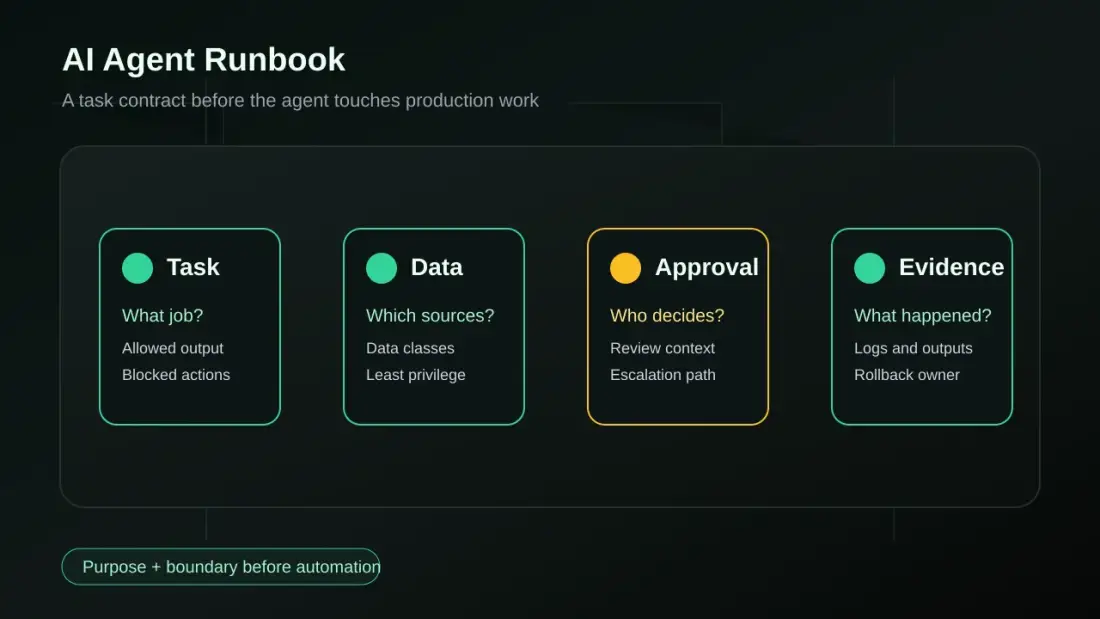
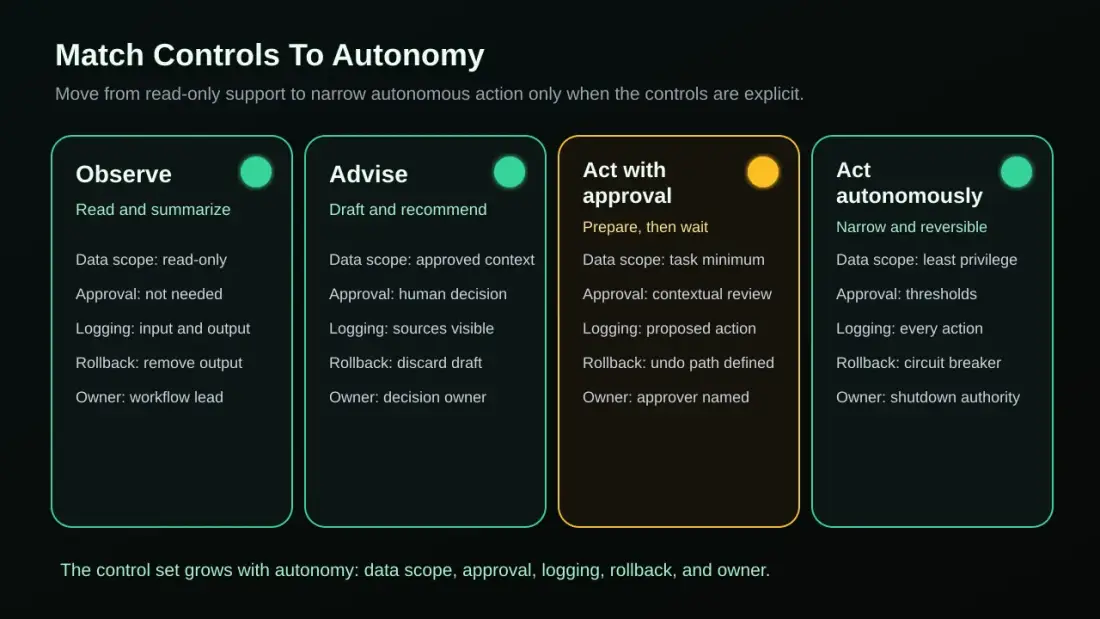
The runbook separates four operating modes. An observing agent reads and summarizes. An advisory agent recommends but does not decide. An agent with approval prepares actions and waits for a human. An autonomous agent acts only inside narrow, reversible, low-risk boundaries.
That distinction lowers the pressure in the conversation. You do not need to ban every AI experiment. You do need to prevent a small convenience agent from quietly becoming a production agent.
The AI Agent Runbook
A runbook is not a policy binder. It is an operating document for one concrete workflow. It says what task the agent performs, which systems it touches, which data it may read, which actions are blocked, when a human must decide, where evidence lives, and who can stop the agent.
That makes it different from a prompt. A prompt describes behavior. A runbook describes operations. Prompts need sources, test cases, permissions, logs, fallback behavior, and an owner. Otherwise, the prompt is only a well-written intention.
Define the task contract first
The task contract is the smallest useful unit. It names purpose, input sources, allowed outputs, blocked actions, success signal, and owner. For inquiry triage, it might say: the agent reads approved service information and CRM context, classifies urgency, creates an internal summary, and proposes a reply. It does not send customer messages or change contract data without approval.
Good task contracts are narrow. They give the agent enough room to be useful, but not enough room to invent business policy unseen. If you cannot write the task contract in a few sentences, the workflow is not ready for more autonomy.
Match controls to autonomy
The control question starts with operating mode. An observing agent needs different boundaries than an agent that might send a customer email or write to the CRM. If you treat both the same, you create either bureaucracy or risk.
Start with the autonomy lane instead of a long checklist. Then define data scope, approval, logging, rollback, and owner. These five control fields are enough for many first SME workflows because they expose the main operating gaps.
| Operating mode | Typical use | Minimum control |
|---|---|---|
| Observe | Summarize, classify, flag gaps | scoped data, execution log, named owner |
| Advise | Draft, recommend, prioritize | human decision, visible sources, reviewable output |
| Act with approval | Prepare ticket, suggest CRM update, hand over reply draft | contextual approval, evidence trail, failure path |
| Act autonomously | Narrow reversible routine action | least-privilege access, thresholds, monitoring, stop button |
Give the agent an owner, a log, and a stop button
Every production-facing agent needs a business owner, a technical owner, and a stop path. In a small team, that may be the same person. The role still cannot be invisible. If a customer receives a wrong answer or a workflow stalls, the team must know who investigates, stops, and decides.
The log is not only a technical detail. n8n can make executions visible, support human-in-the-loop steps, and model error paths through an Error Trigger. That is not automatic audit or compliance. It is useful implementation support so execution, errors, and reviews are not reconstructed from memory.
Use case: controlled inquiry triage
A DACH service company receives requests through its website, email, and customer channels. Today, a team member reads every message, looks up service information, checks CRM context, writes a first summary, and decides who should reply. The workflow is recurring, but not fully trivial.
An unmanaged agent would quickly do too much: read customer email, use old website copy, assess urgency, formulate a reply, and maybe create a task or message directly. That sounds efficient until the agent uses an outdated service description, includes sensitive CRM notes, or prepares a wrong promise.
The controlled path starts narrower. The agent may read only approved service information and defined CRM fields. It classifies the inquiry, flags missing information, creates an internal summary, proposes a reply, and routes the case to a human approver. No external reply goes out without approval. CRM or task updates happen only through approved automation. Source, draft, approval, and final action are logged.
This example is illustrative, not a published customer case. Planfold's n8n operations automation proof does show the relevant capability layer: recurring workflows, clear handoffs, monitoring, and error transparency in operated automation.
How Planfold applies Plan -> Unfold -> Resonate
Planfold treats AI agent governance as an operating question, not a slide exercise. The first step is not "which model?" It is "which workflow, which data, which autonomy, and which owner?" That keeps the agent inside a controlled digital machine.
Plan means mapping workflow, data classes, systems, roles, trust boundary, approvals, and risk. This is where the task contract is written. It is also where the team decides whether the agent should observe, advise, act with approval, or stay out of production for now.
Unfold means building the first controlled workflow. That includes limited permissions, managed credentials, tests, approval steps, execution logs, failure paths, and a manual fallback. An agent gets near production only when those operating parts are built with it.
Resonate means learning from operations. Correction rate, approval time, missing information, failure paths, review fatigue, and team trust show whether the agent should become broader, stay narrow, or be reduced. This is where the runbook is maintained instead of forgotten.
Regulatory topics need careful framing. The EU AI Act, GDPR, or NIS2 may matter depending on purpose, sector, data, and role. This article is not legal advice and not a compliance checklist. It describes the operating foundation that makes conversations with legal counsel, customers, insurers, or auditors more concrete: purpose, data, owner, approval, evidence, and stop path.
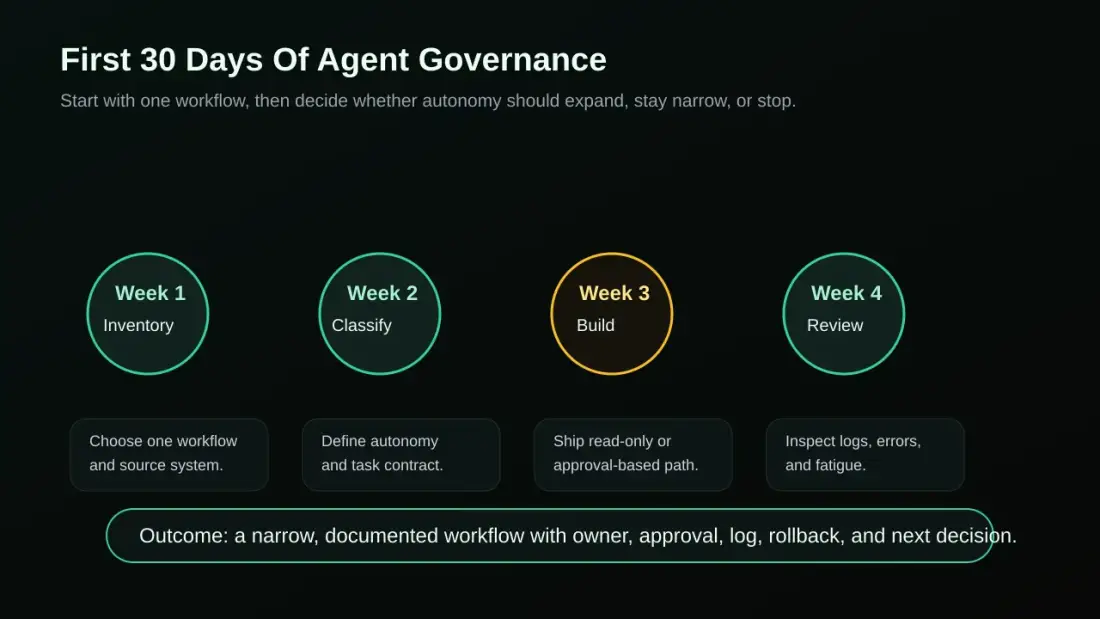
The first 30 days of agent governance
You do not need a year-long program to get out of guesswork. Choose one AI-assisted workflow that already happens informally or costs visible time every week. The starting point should be bounded enough for mistakes to stay visible and important enough for improvement to matter.
Week 1: Inventory the candidate and sources. Which task should the agent support? Which systems does it read? Which data classes are involved? Are the inputs public, internal, customer, employee, financial, or contractual? Where is shadow AI already happening?
Week 2: Classify autonomy and define the task contract. Decide whether the agent may observe, advise, act with approval, or act autonomously. Write down allowed sources, allowed outputs, blocked actions, owner, approval rule, and success signal.
Week 3: Build a read-only or approval-based workflow. Start conservatively. A read-only agent or an agent with approval can already reduce work without unseen customer-facing actions or system changes. n8n, internal tools, or other orchestration can be useful when credentials and logs are managed properly.
Week 4: Review logs, errors, and approval fatigue. Do not look only at speed. Review correction rate, missing context, failed executions, reviewer click-through behavior, escalations, and team trust. Then decide whether autonomy should increase, stay the same, or decrease.
The practical next step
If you want to start today, choose exactly one AI-assisted path. Not "AI in sales" and not "agents in the company". Choose one concrete workflow: inquiry triage, quote preparation, support summary, meeting-to-task, or internal knowledge search.
Then write down five things: task, data sources, allowed action, approval point, and stop path. If those five fields are unclear, the agent is not production-ready. If they are clear, Planfold can turn them into a roadmap and the first controlled workflow.
Plan. Unfold. Stay Sovereign.
Related Posts
When a Foreign Government Gates Your AI Access: Sovereign AI Procurement as a Board-Level Risk for SMEs
The Economics of Open-Weight AI: Why Self-Hosting Now Makes Business Sense for SMEs