

Reducing Manual Work Through Practical Internal Automation
An anonymized implementation story about replacing repetitive operational routines with structured workflows across ticketing, monitoring, onboarding, identity, password renewal, and recurring business data handoff.
Confidentiality note
This page is based on real implementation work carried out in an employer context. Specific organizations, system names, workflow boundaries, and operational details were adapted to preserve confidentiality while keeping the implementation pattern accurate.
Relevant service pages
Automation / Operations
What this enabled
- Less repetitive manual handling across recurring internal routines
- More consistent execution of onboarding and service-related workflows
- Clearer handoff between technical systems and business process steps
- Better visibility when recurring process logic failed or needed adjustment
Contents
- Context
- Challenge
- Approach
- What should be fully automated
- What should trigger structured follow-up
- Which systems needed to be tied together carefully
- Implementation
- System-related ticket workflows
- Monitoring-linked automation
- Onboarding across identity systems
- Secure password renewal with Keycloak
- Recurring mail-to-business-data transfer
- Visibility and error handling
- Outcome
- Who This Is Relevant For
- CTA
The issue was not missing software. It was too much routine work between systems.
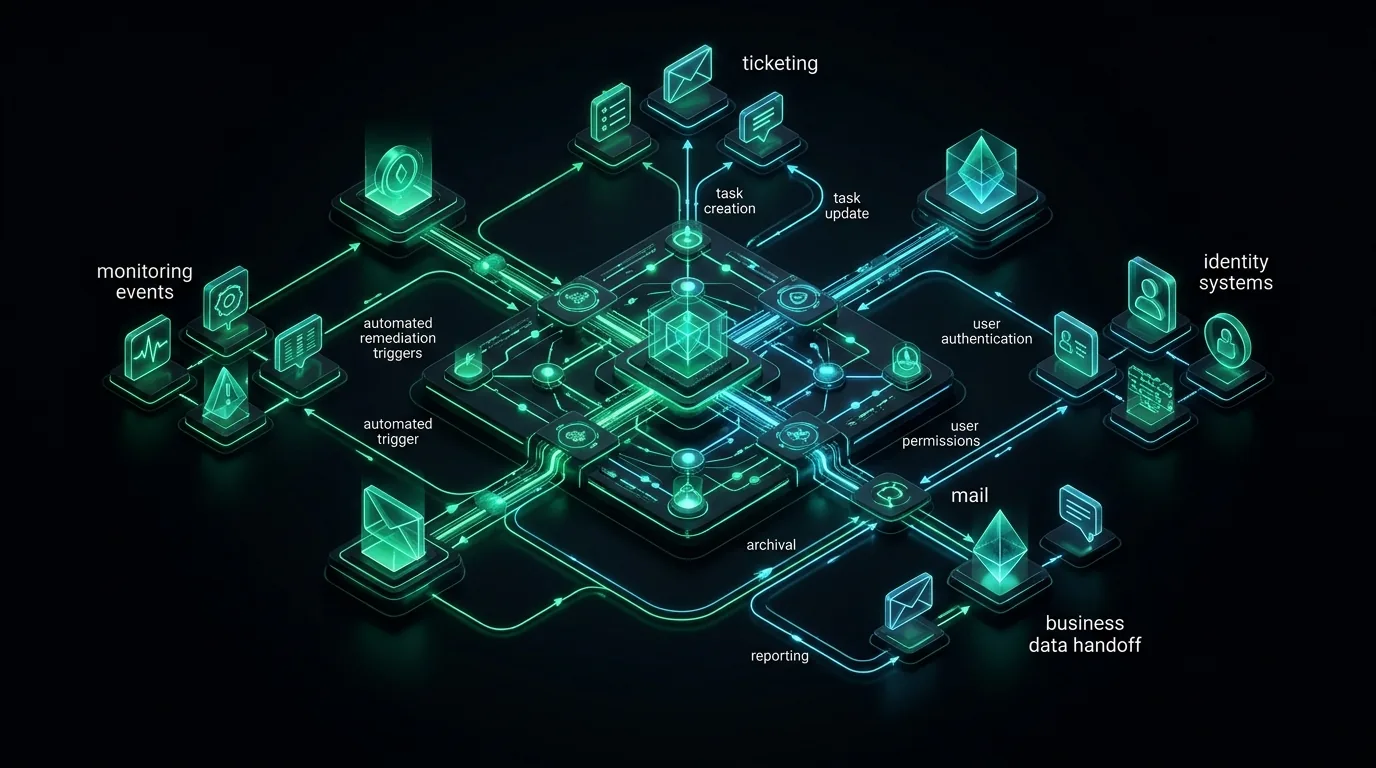
A recurring pattern showed up across internal operations: information moved between monitoring, ticketing, identity systems, mail, and business tools, but the handoffs were still manual, inconsistent, or hidden inside personal workarounds. The implementation focus was to turn those routines into a more reliable process layer.
Context
This type of work appears in organizations that have enough systems to create operational friction, but not enough structure yet to make the daily routines feel controlled.
Tickets get created, enriched, and routed by hand. Monitoring events require someone to interpret and forward the right information. Onboarding depends on a mixture of identity systems, checklists, and manual follow-up. Routine business data arrives by mail and still has to be transferred into SharePoint or spreadsheet-oriented workflows. Password renewal or access-related steps may involve identity tooling such as Keycloak, but the surrounding process still depends on manual coordination.
None of those activities are individually dramatic. Together, they create a steady drain on attention and make quality depend too much on who is available and how carefully they remember the process.
Challenge
The core problem was not simply that tasks were manual. It was that the manual work sat at the boundary between systems.
That is where internal operations often become messy. One tool knows about monitoring. Another holds tickets. Identity lives elsewhere. Business teams still depend on mailboxes, SharePoint, or spreadsheet-oriented workflows. The organization ends up with many small handoffs that are easy to ignore individually and expensive to tolerate collectively.
There was also a trust problem to solve. Replacing manual routines with automation only helps if the workflows become understandable and dependable. If the result is a pile of disconnected automations with unclear ownership, the business trades manual work for a different kind of fragility.
Approach
The work was framed as automation of recurring internal operations and back-office workflows across systems.
That framing mattered because it kept the implementation coherent. Instead of treating each automation as an isolated idea, the goal was to build a more reliable process layer for repetitive internal work.
n8n served as the orchestration layer, but it was not the story by itself. The more important decisions were:
What should be fully automated
Some routines were repetitive and predictable enough to run end to end with clear rules.
What should trigger structured follow-up
Some workflows were better treated as controlled handoffs. For example, a monitoring event or inbound message might trigger ticket creation, enrichment, or routing rather than a blind chain of automated actions.
Which systems needed to be tied together carefully
Identity systems such as LDAP, Active Directory, or Keycloak bring different assumptions than business-facing destinations such as SharePoint or spreadsheet-based workflows. The implementation had to make those boundaries explicit instead of pretending they were all the same kind of integration.
Implementation
Several recurring workflow types shaped the delivery.
System-related ticket workflows
One part of the work focused on ticket creation and follow-up around operational events. Instead of relying on manual triage for every recurring case, workflows could collect relevant information, create the right ticket context, and route the next action more consistently.
Monitoring-linked automation
Monitoring data became more useful when it triggered process logic instead of waiting for someone to notice and retype the relevant details elsewhere. This was not about replacing human judgment in all cases. It was about removing repetitive coordination steps around the event.
Onboarding across identity systems
Onboarding work often looks simple on paper and messy in practice. When LDAP or Active Directory is involved, identity-dependent steps need to happen in the right order and with the right context. Structured workflows helped make that sequence more repeatable.
Secure password renewal with Keycloak
Where password renewal processes touched Keycloak, the surrounding workflow could be handled in a more controlled way instead of relying on ad hoc communication or one-off manual steps.
Recurring mail-to-business-data transfer
Another recurring pattern was routine extraction of operational or business data from mail and transfer into SharePoint or Excel-like workflows. That kind of work is often tolerated for too long because each individual transfer seems minor. In reality, it is exactly the kind of repetitive handling that benefits from a clear workflow layer.
Visibility and error handling
The implementation did not stop at "the workflow runs." Monitoring, handling of failures, and explicit process structure mattered because silent failure is one of the fastest ways to make automation untrusted.
Outcome
The outcome was not a fictional overnight transformation. It was a more controlled way of handling recurring internal work.
Repetitive process steps required less manual coordination. Internal routines became less dependent on personal memory. Onboarding and service-related workflows gained more consistent execution. Monitoring-driven events were easier to route into action. Routine business data transfer became more structured.
Just as importantly, the automation scope made more sense as one operating model. It no longer felt like a random collection of unrelated automations.
Who This Is Relevant For
This kind of work is relevant for organizations that feel operational friction every day but have not yet turned it into a proper automation initiative.
It is especially relevant when the problem is not one giant workflow, but many smaller recurring routines across existing systems. That is often where practical automation creates the most believable value.
CTA
If your team is spending too much time moving information between systems, repeating the same internal steps, or compensating for fragmented process handling, PLANFOLD's automation service is built for exactly that kind of work.
Implementation highlights
- Ticket creation and handling workflows around system-related operational processes
- Integration with monitoring signals to trigger follow-up actions instead of manual triage
- Onboarding flows connected to LDAP or Active Directory
- Secure password renewal workflows connected with Keycloak
- Recurring mail-to-SharePoint or spreadsheet-style business data transfers
Why this should build trust
- The examples belong to one coherent category: recurring internal operations and back-office workflow automation
- The implementation spans both technical triggers and business-facing process destinations
- The focus stays on reliability and repeatability rather than no-code novelty
Why this matters commercially
This is the kind of implementation work PLANFOLD is designed to support when recurring internal routines are slowing a business down. The value is not in flashy automation demos. It is in reducing repetitive work, making process handling more consistent, and creating an automation layer people can actually trust.
Keep exploring
Related case studies

Controlled Kubernetes Delivery Across Development, Staging, and Production
An anonymized implementation story about introducing a disciplined Kubernetes delivery model with GitLab CI, Nexus3, Helm, Kustomize, and ArgoCD, operated on Rancher-managed RKE2 and K3s clusters on vSphere.
Commercial context
Buyers evaluating Kubernetes delivery modernization, GitOps operating models, or staged release control on self-managed infrastructure
Trust signal
Shows practical experience designing controlled Kubernetes delivery with artifact governance, staged promotion, and pragmatic cluster operations

Standardizing Infrastructure Operations Across Mixed Linux and Windows Environments
An anonymized implementation story about bringing recurring Linux and Windows administration under Git-governed control with GitLab, GitLab CI, Ansible, and Semaphore.
Commercial context
Buyers evaluating how to reduce manual system administration and standardize infrastructure operations across mixed Linux and Windows environments
Trust signal
Shows practical experience turning recurring infrastructure work into a Git-governed, less person-dependent operating model