Architecture for Humans: Reducing Cognitive Load in Digital Systems
Digital systems often work technically while exhausting the people who run them. Learn how human-centered architecture reduces workflow complexity, handoff risk, and operational drag.
Contents
Digital systems often work technically while exhausting the people who run them. Learn how human-centered architecture reduces workflow complexity, handoff risk, and operational drag.
Share this article
The moment the system works but the team is tired
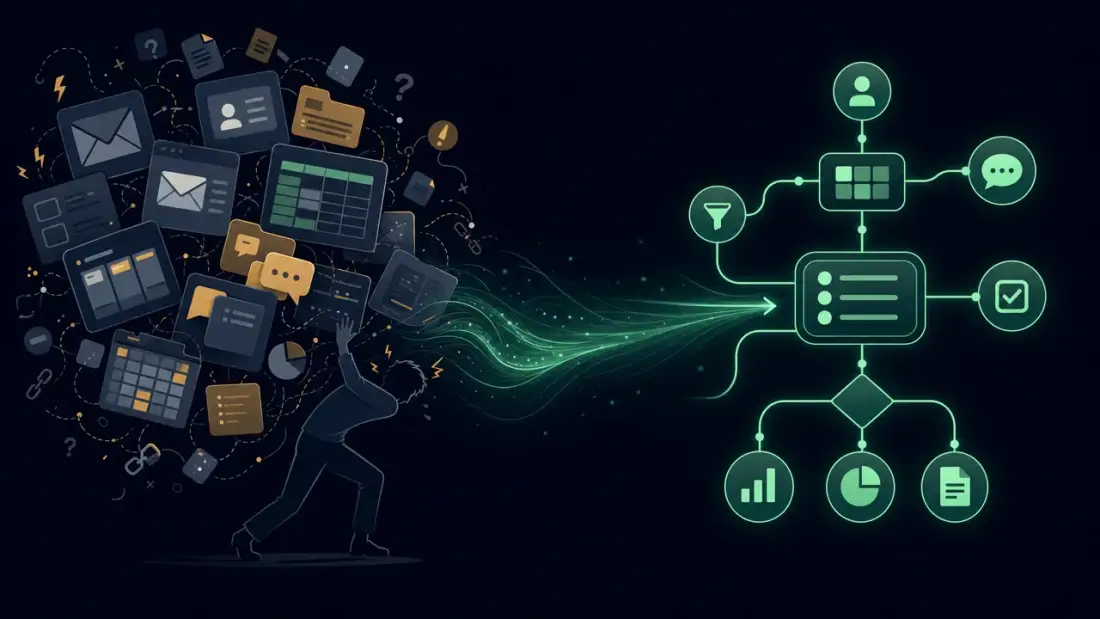
A customer request arrives through the website. The shared inbox has the first message, the CRM has a contact, the scheduling sheet may contain a slot, and the project board has a card with a similar name. Nothing is down. The stack is technically online. Yet nobody can say, with confidence, where the request stands and who owns the next move.
That is where digital complexity becomes human cost. People do not only do the work. They reconstruct the operating system around the work: which tool is authoritative, which exception applies, which automation ran silently, and which change is safe.
For startups, SaaS teams, and lean operators, this is execution drag. A small team can move fast only while context is cheap. When every decision requires Slack archaeology, tribal memory, and repeated checking across tools, the system has not scaled the team. It has created a memory tax.
Architecture for humans means designing digital operations so people can understand, operate, hand over, and recover the system. In Planfold language, that becomes a Digital Headquarters: the coordination layer where knowledge, state, workflow ownership, automation behavior, and decision paths are inspectable enough for a lean team to move without losing control.
What cognitive load looks like in daily operations
Cognitive load describes the mental effort required to process task information with limited working memory. In operations, some load is inherent. Pricing a complex deal, triaging an edge case, or debugging a production workflow is real work. The avoidable load comes from unclear systems: scattered tools, ambiguous labels, hidden exceptions, and undocumented automation.
That load rarely appears as a single incident. It appears as repeated questions, slower onboarding, hesitated changes, duplicated checks, and senior people becoming routers for the rest of the team. Microsoft's Work Trend Index 2024 shows how deep this friction runs: 68 % of employees struggle with the pace and volume of work, 46 % report burnout, and 60 % of time in Microsoft 365 apps goes to email, chat, and meetings — only 40 % to creative work. For SMEs and startups, the impact is sharper because the same few people carry strategy, delivery, support, and systems knowledge at once. Bitkom's Digitalisierung der Wirtschaft 2025 reports that 53 % of companies struggle to manage digitalization projects, up 19 percentage points since 2022. Meanwhile, the KfW Digitalisierungsbericht 2024 notes that the share of companies with completed digitalization projects rose despite difficult conditions. The willingness is there; the steering capacity often is not.
Remembering the tool map
Most teams do not have a living architecture map. They have a mental map. Product knows which board column matters. Support knows which inbox label overrides the CRM. Engineering knows which webhook sometimes lags. Founders know which exception should never be automated.
That private map is expensive. Every new hire has to learn the official process and the unofficial correction layer. Every new tool adds another branch to the map. If the work cannot teach itself through the system, the team pays for context through interruptions.
Remembering the exception rules
Exceptions are not a bug in business. VIP customers, manual approvals, regional constraints, enterprise contract terms, technical edge cases, and rollout freezes are normal. The risk starts when those exception rules live only in memory or old messages.
Automation then becomes brittle. A form can create a record, but it does not know that one segment requires a manual review. A CRM can show a status, but it does not explain why the next action is blocked. Human-centered architecture makes these rules visible near the work instead of relying on private recall.
Remembering the recovery path
Teams are willing to change systems when they know how to recover. If nobody can see which automation touched a record, whether a retry happened, where the error landed, or who owns the fix, the team slows down for good reasons.
Trust is not created by a green dashboard alone. Trust comes from inspectability: logs, notifications, owners, escalation paths, and stop points. A workflow that cannot explain its last action is not ready to become critical infrastructure.
The hidden cost of systems people cannot hold in their heads
The cost of digital complexity is easy to miss because it hides inside normal work. Marcus runs an 18-person IT services firm with no dedicated operations staff. His team handles 40 to 50 customer inquiries each week. Each inquiry touches a website form, a shared inbox, a CRM contact, a scheduling slot, a proposal template, and a project board card. Operations coordinator Anja owns intake; IT technician Stefan owns delivery; workflow designer Lukas owns proposals. When an inquiry escalates to a non-standard contract, Marcus reviews and approves manually before any proposal goes out — that approval is the human review gate. But it lives in a WhatsApp thread, not in the workflow. No audit trail records whether the review happened or who approved what.
If each inquiry creates eight minutes of extra clarification because ownership or state is unclear, that is six to seven hours of coordination drag per week. This workload model is illustrative, not a universal benchmark.
The visible hours are only part of the bill. The deeper cost is slower delegation, delayed response, fragile handoffs, duplicated data entry, and senior people spending their best attention as human middleware.
Time lost to context reconstruction
Context reconstruction feels small until it becomes the default. A person checks the inbox, then the CRM, then the board, then a chat thread, then asks the person who "usually knows." None of that is customer value. It is system repair performed manually.
As the team grows, the problem compounds. More people need the map. More tools create more states. Without architecture, communication load grows faster than execution capacity.
Trust lost to unclear handoffs
People stop trusting tools when the tools do not give a reliable answer. A status field is useful only if the team knows who sets it, when it changes, which automation uses it, and what happens next.
When handoffs are unclear, teams create a second workflow to verify the first one. That is why operations end up with status meetings, repeated "just checking" messages, and manual reconciliation. Automation that still requires manual proof of completion is not leverage. It is a new place to look.
Money lost to senior-person dependency
The most expensive version of this problem is a senior person who carries the whole operating model in their head. They answer routing questions, explain exceptions, validate records, fix handoff mistakes, and prevent the system from falling over.
That looks like expertise. It is also a single point of failure. Vacation, hiring, growth, and turnover reveal whether the workflow lives in the system or in one person's memory.
Architecture for humans starts with the work, not the stack
Most digital projects start with stack questions: Which CRM? Which automation platform? Which AI tool? Those questions matter, but they arrive too early. A human-readable system starts with the work: what decision has to be made, what information is required, who owns the next step, and what happens when the happy path fails?
ISO 9241-210 frames human-centered design around users, tasks, environments, evaluation, and iteration. In operational terms, that means a tool inventory is not enough. You need a map of decisions, state, ownership, exceptions, and recovery paths.
Map decisions, not only applications
A classic architecture view shows boxes: website, CRM, billing, automation, project management. That is useful, but incomplete. People do not operate boxes. They operate questions: Is this lead qualified? Is the proposal approved? Is the handoff complete? Should automation continue or stop?
A better architecture map shows decisions, inputs, outputs, owners, exception rules, and review points. It shows where humans must decide and where automation can safely support the path.
Put state where people can see it
State is the operating primitive. Where does the work stand? Who owns it? What action happened last? What exception blocks the next step?
Visible state reduces guessing. Hidden state creates meetings, messages, and anxiety. The implementation could be a CRM field, ticket, board, audit log, or simple status model. The format matters less than reliability.
Make automation explainable enough to operate
Automation should not disappear once it runs. It needs triggers, logs, errors, retries, owners, and human review points. OpenTelemetry defines observability as understanding internal system state through outputs such as traces, metrics, and logs. A startup does not need to copy the operating model of a large-scale SRE organization, but the principle travels well: if a workflow matters, the team must be able to ask why it behaved a certain way.
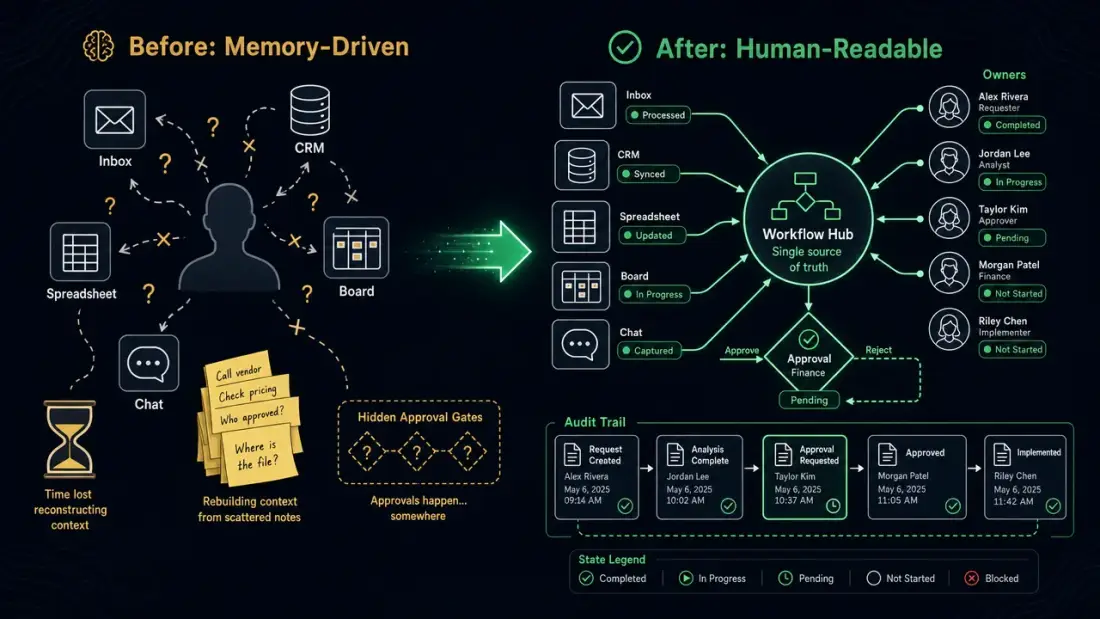
From memory-driven operations to human-readable workflows
Picture a customer journey that grew organically: inquiry, qualification, proposal, scheduling, delivery, invoice, follow-up. Each piece works on its own. The problem lives between the pieces. The inbox knows the tone, the CRM knows the contact, the schedule knows the date, automation moves data, and the human has to assemble reality.
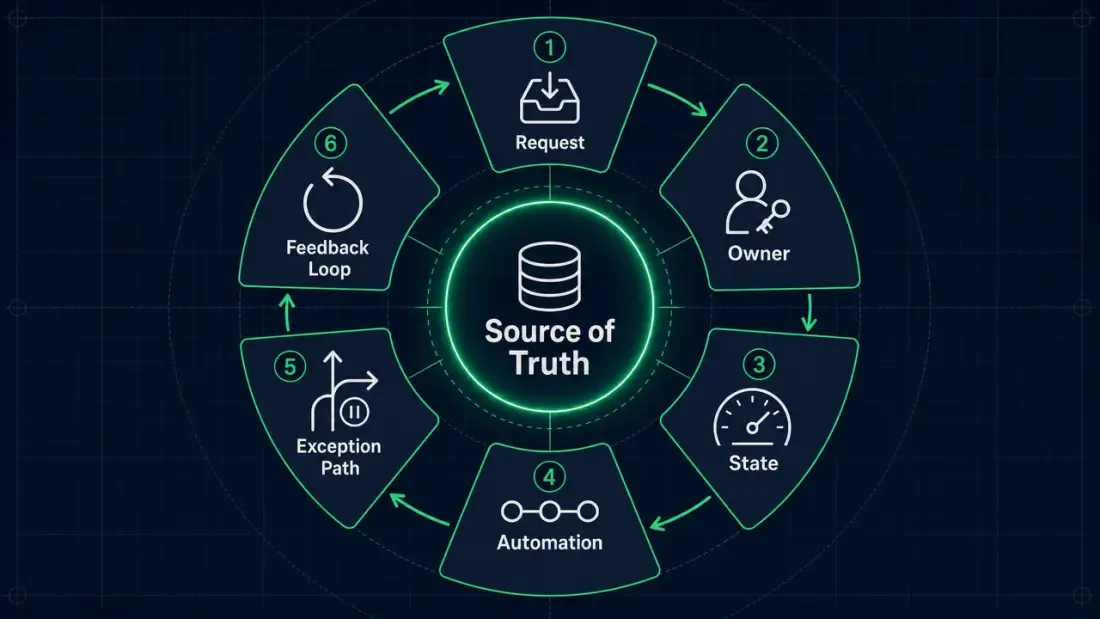
Planfold treats this as an operating-model problem before treating it as a software problem. Where is the source of truth? Which status is binding? Which role owns the next step? Which exception can run automatically, and which one requires review?
Before: a customer journey held together by memory
In the starting state, the workflow is carried by habit. Someone knows the scheduling sheet matters more than the CRM. Someone knows which customer segment never receives the default email. Someone remembers which n8n or Zapier workflow was changed six months ago.
Small teams can hide this weakness for a while. Growth exposes it. New hires ask the same questions. Founders get pulled into details. Automations are not extended because nobody is sure what they trigger.
After: a workflow people can explain
A human-readable workflow defines rules where the work happens. Every stage has a source of truth, owner, visible state, and exception path. Automation records its work. Failures do not vanish into a tool account; they land with a responsible role and enough context to act.
That is not bureaucracy. It is the condition for useful automation. Planfold has shipped recurring workflow patterns that connect monitoring, ticketing, identity, mail, and business data through controlled handoffs. In a concrete n8n implementation for Marcus's firm, the After workflow follows explicit sequencing:
- CRM creation. A new inquiry creates a CRM record with source, timestamp, and status.
- Routing. The workflow routes by project type — operations coordinator Anja for intake, IT technician Stefan for technical assessment, workflow designer Lukas for proposals.
- Manual approval gate. For non-standard contracts, the workflow pauses and requests explicit approval from Anja before any proposal is generated. Anja reviews and decides directly in the workflow — no chat thread required.
- Timestamped audit log. Every step writes a permanent entry:
2026-05-11T09:14:00Z — Anja triaged inquiry #1234 to Stefan;2026-05-11T10:22:00Z — Stefan flagged contract terms for review;2026-05-11T11:05:00Z — Anja approved non-standard contract terms;2026-05-11T11:07:00Z — Lukas triggered proposal template. - Proposal trigger. Only after approval and logging does the workflow generate the proposal.
- Human override. If any step fails, the workflow stops, notifies the responsible owner, and logs the exception with timestamp and actor — so Marcus can see exactly what happened without opening a chat app.
The point is not that every company needs the same stack. The point is that critical handoffs need an operating model with visible state, named owners, explicit review gates, and a permanent log.
How Planfold turns complexity into a Digital Headquarters
Planfold is not trying to add another tool to the pile. The work is to turn grown digital systems into something people can operate. That is where Plan -> Unfold -> Resonate becomes a technical operating mode, not a slogan.
For a lean team, the Digital Headquarters is the coordination layer where state, ownership, automation, knowledge, and decisions are visible enough to support action. It does not eliminate all complexity. It makes critical complexity owned and inspectable.
Plan: expose the cognitive load
Planning starts with the real work. Where do people ask repeated questions? Where do systems disagree? Where is ownership unclear? Where does one senior person know the exception path?
This shows where architecture is currently stored in human memory. Once that load is visible, the next move can be chosen: documentation, process design, automation, access boundaries, observability, or cleanup.
Unfold: build the operating layer
Unfold turns the map into an operating layer: clear sources of truth, understandable status models, controlled automation, logs, roles, and documentation near the work.
That could become a Digital Headquarters, automation hub, cleaner CRM structure, or operations board. The form depends on the business. The requirement is the same: people must have fewer things to remember before making a safe decision.
Resonate: keep the system human-readable
Systems drift. Processes change, tools get replaced, exceptions accumulate, and new people join. Resonate means maintaining the machine through monitoring, feedback, onboarding, cleanup, and review.
This is how a team keeps speed without surrendering control. The goal is not to make everyone a platform engineer. The goal is to let the team control the system without carrying all of it in private memory.
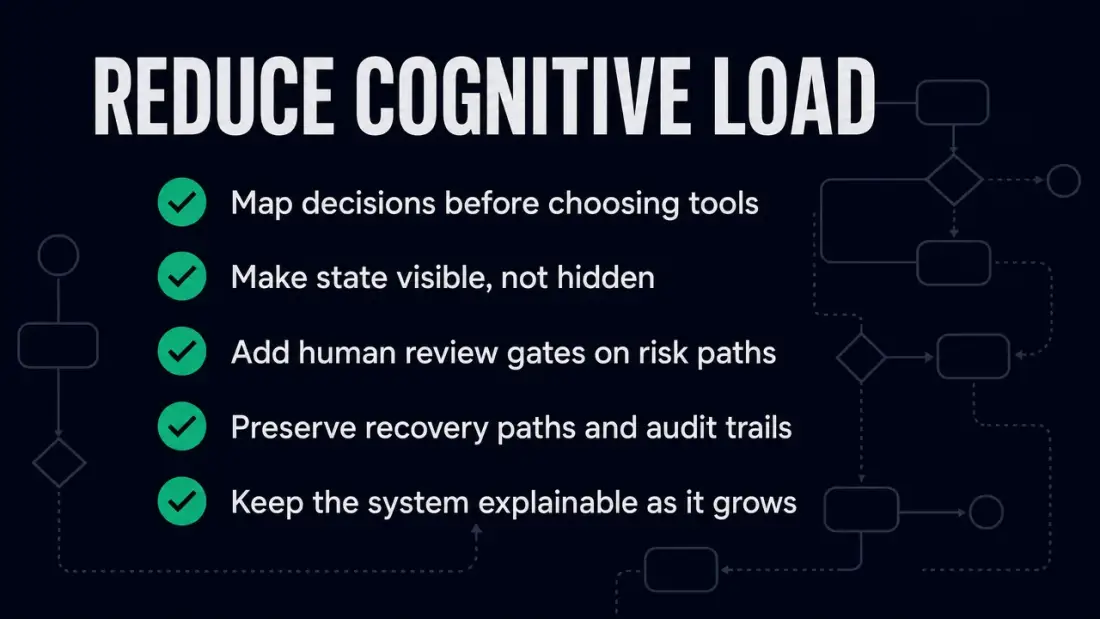
A practical starting point: one workflow everyone can read
Do not start with the whole company. Start with one workflow that creates repeated questions: new customer intake, proposal approval, scheduling, support triage, invoice approval, or project handoff.
Choose a workflow where clarity will be felt immediately. If the team asks fewer status questions, checks fewer tools, and can reconstruct automation behavior faster, the improvement becomes tangible.
Choose a workflow with repeated questions
Good candidates produce phrases like: "Where does this stand?", "Who owns this?", "Which version is valid?", "Did the automation run?", or "What happens if this fails?"
Those questions are not a people problem. They are architecture signals. A workflow that must constantly be explained has not yet been designed as a system.
Measure clarity before scale
Avoid imaginary ROI. Measure operating signals: clarification pings per week, manual status checks, time for a new hire to handle a standard request, exception cases routed to the founder, and time to identify the last automation action.
The real outcome: less guesswork, more leverage
Architecture for humans is not a luxury pattern for large companies. Lean teams need systems that do not depend on memory, heroics, and chat search. When work is visible, people can decide faster, hand over safely, and automate with less fear.
That is the difference between a tool collection and a Digital Headquarters. The tool collection grows by accident. The Digital Headquarters makes ownership, state, and recovery visible.
If you want to start now, pick one workflow where the team repeatedly asks about status, ownership, or exceptions. That is the first Planfold leverage point: plan what really happens, unfold what humans can operate, and keep the system resonating in daily work.