
Planfold starts its open beta: plan with AI, zero data retention by default
Why Planfold exists, how Planfold protects your content in AI requests, what you can do with it today and what beta means.
Contents
Why Planfold exists, how Planfold protects your content in AI requests, what you can do with it today and what beta means.
Share this article
Why Planfold
Notes live in one app, tasks in the next, enquiries in the inbox, documents in a cloud drive and invoices in a spreadsheet. Each of these tools does its job. The work happens in between: retyping, copying, sorting. It stays with you.
One more chat window next to them changes little. It sees only fragments, and in the end it is one more tool.
Planfold is meant to become the place where everything that needs your attention arrives: from private life, from your own company and from your job. The AI turns it into something you can work through. With this beta, Planfold starts with the first step: planning.
Your content in AI requests
Planning with AI means handing over ideas, figures and names from your own work. That is why these rules apply in every new Workspace, without you having to set anything:
- Zero data retention from the start. New Workspaces require ZDR. AI requests then go only to endpoints that OpenRouter lists for ZDR and does not place in the Safety Retention tier. Under OpenRouter's definition, these do not routinely store prompts or responses after processing.
- No training on your content. New Workspaces allow only routes whose reviewed rules exclude training on your prompts and responses.
- A check before every request. Before a request reaches a provider, Planfold checks whether your Workspace may use that route. If it may not, the request does not go out and nothing is charged.
- An hourly check. Every hour, Planfold reads OpenRouter's ZDR list. If a route drops off the list or is flagged there, Planfold stops it for Workspaces with ZDR.
On top of that come settings you choose yourself:
- AI execution in the EU. You can limit a Workspace to routes with documented AI execution in the EU.
- See what applies before you save. Workspace settings show, for chat, dictation and read-aloud, what is available with your choice and what changes as a result.
- All providers at a glance. The privacy policy names all AI providers in one list.
What you can do with Planfold today
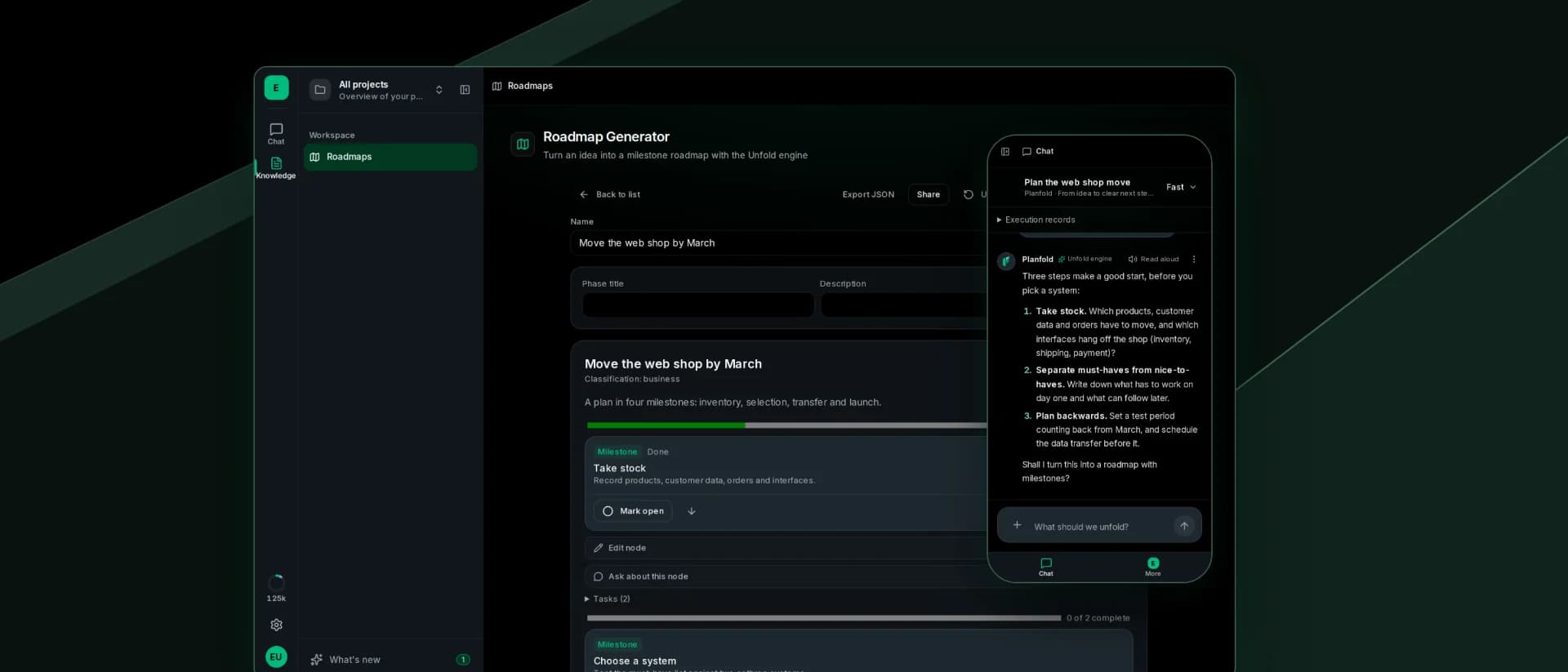
- Turn an idea into a plan. You describe a project, answer a few questions and get a roadmap with milestones. You can find saved roadmaps again later.
- Work out the next steps in conversation. In chat you work with an AI model of your choice. You can dictate and have answers read aloud.
- Keep private and business apart. Next to your personal Workspace, you can create more Workspaces, each with its own privacy rules.
- Know the cost in advance. You see a model's price before you send. You are charged for actual use, in points. When you confirm your e-mail address for the first time, your personal Workspace receives 500 points once.
What beta means
The Planfold App is software in early development. Features are missing, and much will change. Planning works today. Tasks, knowledge and passing work on to your other tools are still missing. What changes is listed here under "What's new".
If something is missing or does not work, write to us at [email protected].
Try it now
Sign in at app.planfold.io with your e-mail address. The code from the e-mail creates your account, and you can start right away.
New in this release
For everyone who already uses Planfold:
- One-line chat input. Files and tools sit behind the plus button, and a chosen tool shows as a chip.
- More reliable chats. Replies show italic text correctly, a chat carries on after an image, and reloaded chats show their execution records and no longer ask again about a price you already confirmed.
- Stricter ZDR setting. "Require zero data retention (ZDR)" now also excludes the Safety Retention tier, and chat offers only what the Workspace may use.
- Overview in the settings. It shows what the Workspace can use with the chosen rules.
- Privacy policy. It now describes more precisely when ZDR applies and names all AI providers in one list.